分面搜索对于现代搜索应用来说,与自动补全、拼写纠正和搜索关键词高亮同样重要,尤其是在电子商务产品中。
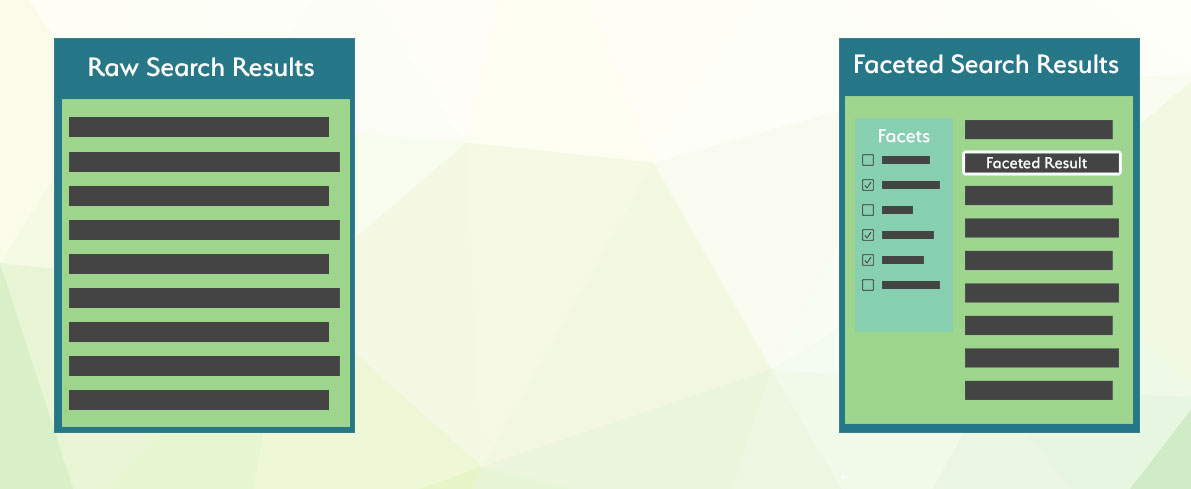
当处理大量数据和各种相互关联的属性时,例如尺寸、颜色、制造商或其他因素,分面搜索就派上用场了。在查询海量数据时,搜索结果常常包含许多不符合用户预期的条目。分面搜索使最终用户能够明确定义他们希望搜索结果满足的条件。
在 Manticore Search 中,有一项优化功能,它会保留原始查询的结果集,并在每个分面计算中重复使用。由于聚合操作应用于已计算好的文档子集,因此速度很快,总执行时间通常仅比初始查询稍长一些。分面可以添加到任何查询中,分面可以是任何属性或表达式。分面结果包括分面值和分面计数。可以通过在查询末尾声明分面,使用 SQL SELECT 语句访问分面。
分面值可以来自属性、JSON 属性内的 JSON 属性或表达式。分面值也可以使用别名,但别名在所有结果集(主查询结果集和其他分面结果集)中必须是唯一的。分面值源自聚合的属性/表达式,但也可以来自另一个属性/表达式。
FACET {expr_list} [BY {expr_list}] [ALL FILTERS | FILTERS {expr_list} | EXCLUDE FILTERS {expr_list}] [ZEROES] [MODE {strict | auto | max}] [DISTINCT {field_name}] [ORDER BY {expr | FACET()} {ASC | DESC}] [LIMIT [offset,] count]多个分面声明必须用空格分隔。
分面可以在 aggs 节点中定义:
     "aggs" :
     {
        "group name" :
         {
            "terms" :
             {
              "field":"attribute name",
              "size": 1000
             }
             "sort": [ {"attribute name": { "order":"asc" }} ]
         }
     }
其中:
group name是分配给聚合的别名field值必须包含要进行分面的属性或表达式的名称- 可选的
size指定结果中包含的最大桶数。未指定时,继承主查询的限制。更多详细信息可以在分面结果大小部分找到。 - 可选的
sort指定一个属性数组和/或附加属性,使用与主查询中的"sort"参数相同的语法。 - 可选的顶层
facet_filter_mode用于控制所有聚合如何继承主查询中的过滤条件。支持的值是strict、auto和max。这是 SQL 中的查询级设置(OPTION facet_filter_mode='...'),也是 JSON 中的顶层设置。 - 可选的按聚合级别
mode用于覆盖该聚合继承到的模式。支持的值是strict、auto和max。这个键只在 JSON 中使用,不是facet_filter_mode的别名。在 SQL 中,对应的按 facet 覆盖方式是在FACET子句里使用MODE关键字。 - 可选的按聚合级别
filters用于显式列出哪些主查询属性过滤条件应该应用到该聚合。在 SQL 中,对应的子句是FILTERS ...。 - 可选的按聚合级别
exclude_filters用于显式列出哪些主查询属性过滤条件不应该应用到该聚合。这个键只在 JSON 中使用;在 SQL 中,对应的子句是EXCLUDE FILTERS ...。 - 可选的按聚合级别
zeroes用于在max模式下启用零计数 bucket。在 SQL 中,对应的按 facet 关键字是ZEROES。如果你想在 SQLmax模式下显示过滤后的可见计数,同时又想保留更宽泛的零计数 bucket,请使用OPTION facet_filter_mode='max' ... FACET ... ALL FILTERS ZEROES。 auto和max属性结果集可以包含一个status桶标记。返回的值为selected、available和unavailable。
结果集将包含一个 aggregations 节点,其中包含返回的分面,key 是聚合值,doc_count 是聚合计数。
    "aggregations": {
        "group name": {
        "buckets": [
            {
                "key": 10,
                "doc_count": 1019
            },
            {
                "key": 9,
                "doc_count": 954
            },
            {
                "key": 8,
                "doc_count": 1021
            },
            {
                "key": 7,
                "doc_count": 1011
            },
            {
                "key": 6,
                "doc_count": 997
            }
            ]
        }
}- SQL
- JSON
- PHP
- Python
- Python-asyncio
- Javascript
- Java
- C#
- Rust
- TypeScript
- Go
SELECT *, price AS aprice FROM facetdemo LIMIT 10 FACET price LIMIT 10 FACET brand_id LIMIT 5;+------+-------+----------+---------------------+------------+-------------+---------------------------------------+------------+--------+
| id | price | brand_id | title | brand_name | property | j | categories | aprice |
+------+-------+----------+---------------------+------------+-------------+---------------------------------------+------------+--------+
| 1 | 306 | 1 | Product Ten Three | Brand One | Six_Ten | {"prop1":66,"prop2":91,"prop3":"One"} | 10,11 | 306 |
| 2 | 400 | 10 | Product Three One | Brand Ten | Four_Three | {"prop1":69,"prop2":19,"prop3":"One"} | 13,14 | 400 |
...
| 9 | 560 | 6 | Product Two Five | Brand Six | Eight_Two | {"prop1":90,"prop2":84,"prop3":"One"} | 13,14 | 560 |
| 10 | 229 | 9 | Product Three Eight | Brand Nine | Seven_Three | {"prop1":84,"prop2":39,"prop3":"One"} | 12,13 | 229 |
+------+-------+----------+---------------------+------------+-------------+---------------------------------------+------------+--------+
10 rows in set (0.00 sec)
+-------+----------+
| price | count(*) |
+-------+----------+
| 306 | 7 |
| 400 | 13 |
...
| 229 | 9 |
| 595 | 10 |
+-------+----------+
10 rows in set (0.00 sec)
+----------+----------+
| brand_id | count(*) |
+----------+----------+
| 1 | 1013 |
| 10 | 998 |
| 5 | 1007 |
| 8 | 1033 |
| 7 | 965 |
+----------+----------+
5 rows in set (0.00 sec)可以通过聚合另一个属性或表达式对数据进行分面。例如,如果文档同时包含品牌ID和名称,我们可以在分面中返回品牌名称,但聚合品牌ID。这可以通过使用 FACET {expr1} BY {expr2} 来实现。
- SQL
- JSON
SELECT * FROM facetdemo FACET brand_name by brand_id;+------+-------+----------+---------------------+-------------+-------------+---------------------------------------+------------+
| id | price | brand_id | title | brand_name | property | j | categories |
+------+-------+----------+---------------------+-------------+-------------+---------------------------------------+------------+
| 1 | 306 | 1 | Product Ten Three | Brand One | Six_Ten | {"prop1":66,"prop2":91,"prop3":"One"} | 10,11 |
| 2 | 400 | 10 | Product Three One | Brand Ten | Four_Three | {"prop1":69,"prop2":19,"prop3":"One"} | 13,14 |
....
| 19 | 855 | 1 | Product Seven Two | Brand One | Eight_Seven | {"prop1":63,"prop2":78,"prop3":"One"} | 10,11,12 |
| 20 | 31 | 9 | Product Four One | Brand Nine | Ten_Four | {"prop1":79,"prop2":42,"prop3":"One"} | 12,13,14 |
+------+-------+----------+---------------------+-------------+-------------+---------------------------------------+------------+
20 rows in set (0.00 sec)
+-------------+----------+
| brand_name | count(*) |
+-------------+----------+
| Brand One | 1013 |
| Brand Ten | 998 |
| Brand Five | 1007 |
| Brand Nine | 944 |
| Brand Two | 990 |
| Brand Six | 1039 |
| Brand Three | 1016 |
| Brand Four | 994 |
| Brand Eight | 1033 |
| Brand Seven | 965 |
+-------------+----------+
10 rows in set (0.00 sec)如果需要从 FACET 返回的桶中移除重复项,可以使用 DISTINCT field_name,其中 field_name 是您希望用于去重的字段。如果您对分布式表进行 FACET 查询,并且不确定表中是否有唯一的ID(表应该是本地的且具有相同的模式),也可以是 id(这是默认值)。
如果查询中有多个 FACET 声明,field_name 在所有声明中应该相同。
DISTINCT 会在 count(*) 列之前返回一个额外的列 count(distinct ...),使您无需进行另一个查询即可获得两个结果。
- SQL
- JSON
SELECT brand_name, property FROM facetdemo FACET brand_name distinct property;+-------------+----------+
| brand_name | property |
+-------------+----------+
| Brand Nine | Four |
| Brand Ten | Four |
| Brand One | Five |
| Brand Seven | Nine |
| Brand Seven | Seven |
| Brand Three | Seven |
| Brand Nine | Five |
| Brand Three | Eight |
| Brand Two | Eight |
| Brand Six | Eight |
| Brand Ten | Four |
| Brand Ten | Two |
| Brand Four | Ten |
| Brand One | Nine |
| Brand Four | Eight |
| Brand Nine | Seven |
| Brand Four | Five |
| Brand Three | Four |
| Brand Four | Two |
| Brand Four | Eight |
+-------------+----------+
20 rows in set (0.00 sec)
+-------------+--------------------------+----------+
| brand_name | count(distinct property) | count(*) |
+-------------+--------------------------+----------+
| Brand Nine | 3 | 3 |
| Brand Ten | 2 | 3 |
| Brand One | 2 | 2 |
| Brand Seven | 2 | 2 |
| Brand Three | 3 | 3 |
| Brand Two | 1 | 1 |
| Brand Six | 1 | 1 |
| Brand Four | 4 | 5 |
+-------------+--------------------------+----------+
8 rows in set (0.00 sec)- SQL
- JSON
- PHP
- Python
- Python-asyncio
- Javascript
- Java
- C#
- Rust
- TypeScript
- Go
SELECT * FROM facetdemo FACET INTERVAL(price,200,400,600,800) AS price_range ;+------+-------+----------+---------------------+-------------+-------------+---------------------------------------+------------+-------------+
| id | price | brand_id | title | brand_name | property | j | categories | price_range |
+------+-------+----------+---------------------+-------------+-------------+---------------------------------------+------------+-------------+
| 1 | 306 | 1 | Product Ten Three | Brand One | Six_Ten | {"prop1":66,"prop2":91,"prop3":"One"} | 10,11 | 1 |
...
+------+-------+----------+---------------------+-------------+-------------+---------------------------------------+------------+-------------+
20 rows in set (0.00 sec)
+-------------+----------+
| price_range | count(*) |
+-------------+----------+
| 0 | 1885 |
| 3 | 1973 |
| 4 | 2100 |
| 2 | 1999 |
| 1 | 2043 |
+-------------+----------+
5 rows in set (0.01 sec)- SQL
- JSON
SELECT *,INTERVAL(price,200,400,600,800) AS price_range FROM facetdemo
FACET price_range AS price_range,brand_name ORDER BY brand_name asc;+------+-------+----------+---------------------+-------------+-------------+---------------------------------------+------------+-------------+
| id | price | brand_id | title | brand_name | property | j | categories | price_range |
+------+-------+----------+---------------------+-------------+-------------+---------------------------------------+------------+-------------+
| 1 | 306 | 1 | Product Ten Three | Brand One | Six_Ten | {"prop1":66,"prop2":91,"prop3":"One"} | 10,11 | 1 |
...
+------+-------+----------+---------------------+-------------+-------------+---------------------------------------+------------+-------------+
20 rows in set (0.00 sec)
+--------------+-------------+----------+
| fprice_range | brand_name | count(*) |
+--------------+-------------+----------+
| 1 | Brand Eight | 197 |
| 4 | Brand Eight | 235 |
| 3 | Brand Eight | 203 |
| 2 | Brand Eight | 201 |
| 0 | Brand Eight | 197 |
| 4 | Brand Five | 230 |
| 2 | Brand Five | 197 |
| 1 | Brand Five | 204 |
| 3 | Brand Five | 193 |
| 0 | Brand Five | 183 |
| 1 | Brand Four | 195 |
...Facets可以通过构造固定大小的桶来对值进行直方图聚合。 键函数是:
key_of_the_bucket = interval + offset * floor ( ( value - offset ) / interval )直方图参数interval必须为正数,直方图参数offset必须为正数且小于interval。默认情况下,桶以数组形式返回。直方图参数keyed使得响应以字典形式返回桶键。
- SQL
- JSON
- JSON 2
SELECT COUNT(*), HISTOGRAM(price, {hist_interval=100}) as price_range FROM facets GROUP BY price_range ORDER BY price_range ASC;+----------+-------------+
| count(*) | price_range |
+----------+-------------+
| 5 | 0 |
| 5 | 100 |
| 1 | 300 |
| 4 | 400 |
| 1 | 500 |
| 3 | 700 |
| 1 | 900 |
+----------+-------------+Facets可以对日期直方图值进行聚合,这与普通直方图类似。不同之处在于,区间由日期或时间表达式指定。此类表达式需要特殊支持,因为区间长度不总是固定的。值会根据以下键函数四舍五入到最近的桶:
key_of_the_bucket = interval * floor ( value / interval )直方图参数calendar_interval理解月份具有不同的天数。
与calendar_interval不同,fixed_interval参数使用固定数量的单位,无论其在日历中的位置如何,都不会偏离。但是fixed_interval无法处理如周或月这样的单位,因为月不是一个固定数量。尝试为fixed_interval指定如周或月这样的单位将导致错误。
接受的区间在日期直方图表达式中描述。默认情况下,桶以数组形式返回。直方图参数keyed使得响应以字典形式返回桶键。
在 JSON 查询中,date_histogram 还支持 time_zone 和 offset 与 calendar_interval 一起使用:
time_zone更改用于四舍五入日历桶和格式化key_as_string的时区。它必须是服务器支持的 IANA 时区名称,例如Asia/Novosibirsk。不支持像+03:00这样的数字 UTC 偏移量。offset在四舍五入之前通过固定量移动日历桶边界。它可以是使用与fixed_interval相同单位的固定间隔字符串,例如3h,或者以秒为单位的整数,例如10800。该值可以以+或-前缀。
time_zone 和 offset 不支持 fixed_interval。
- SQL
- JSON
SELECT count(*), DATE_HISTOGRAM(tm, {calendar_interval='month'}) AS months FROM idx_dates GROUP BY months ORDER BY months ASC+----------+------------+
| count(*) | months |
+----------+------------+
| 442 | 1485907200 |
| 744 | 1488326400 |
| 720 | 1491004800 |
| 230 | 1493596800 |
+----------+------------+- SQL
- JSON
- JSON 2
SELECT COUNT(*), RANGE(price, {range_to=150},{range_from=150,range_to=300},{range_from=300}) price_range FROM facets GROUP BY price_range ORDER BY price_range ASC;+----------+-------------+
| count(*) | price_range |
+----------+-------------+
| 8 | 0 |
| 2 | 1 |
| 10 | 2 |
+----------+-------------+Facets可以对一组日期范围进行聚合,这与普通范围类似。不同之处在于,from和to值可以使用日期数学表达式表示。此聚合包括from值并排除每个范围的to值。将keyed属性设置为true使得响应以字典形式返回桶键,而不是数组。
- SQL
- JSON
SELECT COUNT(*), DATE_RANGE(tm, {range_to='2017||+2M/M'},{range_from='2017||+2M/M',range_to='2017||+5M/M'},{range_from='2017||+5M/M'}) AS points FROM idx_dates GROUP BY points ORDER BY points ASC;+----------+--------+
| count(*) | points |
+----------+--------+
| 442 | 0 |
| 1464 | 1 |
| 230 | 2 |
+----------+--------+Facets支持ORDER BY子句,就像标准查询一样。每个Facet可以有自己的排序方式,Facet的排序不会影响主结果集的排序,这由主查询的ORDER BY决定。排序可以基于属性名、计数(使用COUNT(*)、COUNT(DISTINCT attribute_name))或特殊的FACET()函数,该函数提供聚合数据值。默认情况下,带有ORDER BY COUNT(*)的查询将按降序排序。
- SQL
- JSON
SELECT * FROM facetdemo
FACET brand_name BY brand_id ORDER BY FACET() ASC
FACET brand_name BY brand_id ORDER BY brand_name ASC
FACET brand_name BY brand_id order BY COUNT(*) DESC;
FACET brand_name BY brand_id order BY COUNT(*);+------+-------+----------+---------------------+-------------+-------------+---------------------------------------+------------+
| id | price | brand_id | title | brand_name | property | j | categories |
+------+-------+----------+---------------------+-------------+-------------+---------------------------------------+------------+
| 1 | 306 | 1 | Product Ten Three | Brand One | Six_Ten | {"prop1":66,"prop2":91,"prop3":"One"} | 10,11 |
...
| 20 | 31 | 9 | Product Four One | Brand Nine | Ten_Four | {"prop1":79,"prop2":42,"prop3":"One"} | 12,13,14 |
+------+-------+----------+---------------------+-------------+-------------+---------------------------------------+------------+
20 rows in set (0.01 sec)
+-------------+----------+
| brand_name | count(*) |
+-------------+----------+
| Brand One | 1013 |
| Brand Two | 990 |
| Brand Three | 1016 |
| Brand Four | 994 |
| Brand Five | 1007 |
| Brand Six | 1039 |
| Brand Seven | 965 |
| Brand Eight | 1033 |
| Brand Nine | 944 |
| Brand Ten | 998 |
+-------------+----------+
10 rows in set (0.01 sec)
+-------------+----------+
| brand_name | count(*) |
+-------------+----------+
| Brand Eight | 1033 |
| Brand Five | 1007 |
| Brand Four | 994 |
| Brand Nine | 944 |
| Brand One | 1013 |
| Brand Seven | 965 |
| Brand Six | 1039 |
| Brand Ten | 998 |
| Brand Three | 1016 |
| Brand Two | 990 |
+-------------+----------+
10 rows in set (0.01 sec)
+-------------+----------+
| brand_name | count(*) |
+-------------+----------+
| Brand Six | 1039 |
| Brand Eight | 1033 |
| Brand Three | 1016 |
| Brand One | 1013 |
| Brand Five | 1007 |
| Brand Ten | 998 |
| Brand Four | 994 |
| Brand Two | 990 |
| Brand Seven | 965 |
| Brand Nine | 944 |
+-------------+----------+
10 rows in set (0.01 sec)在计算分面的桶之前,Manticore 首先决定主查询中的哪些过滤器应应用于该分面。
内置模式:
strict- 应用主查询的所有过滤器并保留常规分面输出
auto- 应用主查询的所有过滤器,但排除该分面本身的过滤器
- 添加一个
status标记;选中的桶为selected,同级桶为available
max- 从宽泛的基础查询中统计桶,并为每个桶添加
status标记
- 从宽泛的基础查询中统计桶,并为每个桶添加
手动覆盖:
- SQL
ALL FILTERS- 将主查询的所有过滤器应用于该分面
- SQL
FILTERS .../ JSONfilters- 仅应用列出的主查询过滤器到该分面
- SQL
EXCLUDE FILTERS .../ JSONexclude_filters- 应用主查询的所有过滤器,但排除列出的过滤器
简要说明:
strict= 应用所有内容auto= 应用所有内容,但排除该分面的过滤器 +statusmax= 宽泛的基础查询统计 +status- SQL
ALL FILTERS= 应用全部 - SQL
FILTERS= 只应用这些过滤条件 - JSON
exclude_filters/ SQLEXCLUDE FILTERS= 应用除这些之外的全部过滤条件
性能说明:
max是最昂贵的分面模式,因为它需要收集宽泛的分面统计和严格/当前可用性元数据- 在大型数据集或包含许多分面的查询中,
max可能比strict或auto慢得多 - 当 UI 需要从当前过滤范围中选择桶时,使用
auto;当还需要包含不可用值的宽泛桶列表时,使用max
示例
如果主查询包含:
brand='nike'color='red'size='small'
并且我们计算 FACET color,则:
strict- 应用
brand + color + size
- 应用
auto- 应用
brand + size - 并返回带有
status=selected的选中颜色桶和带有status=available的同级颜色桶
- 应用
max- 应用不带
brand、color或size的宽泛基础查询 - 并返回带有
status的 color 桶
- 应用不带
filters=["brand"]- 仅应用
brand
- 仅应用
exclude_filters=["size"]- 应用
brand + color
- 应用
- SQL
- JSON
SELECT id
FROM products
WHERE MATCH('sneakers') AND color_id=1 AND size_id=42 AND brand_id=7
OPTION facet_filter_mode='max'
FACET color_id ALL FILTERS
FACET size_id
FACET sku FILTERS color_id, size_id
FACET brand_id EXCLUDE FILTERS color_id;
按 facet 的 SQL 子句含义如下:
ALL FILTERS— 将主查询的所有过滤器应用于该分面FILTERS color_id, size_id— 仅将color_id和size_id过滤器应用于该分面EXCLUDE FILTERS color_id— 将主查询的所有过滤器(除了color_id)应用于该分面MODE max— 覆盖这个 SQL facet 继承来的 facet 模式ZEROES— 在 SQLmax模式下,即使可见的 facet 计数为0,也保留更大maxbucket 集合中的 bucket;在 JSON 中,对应的按聚合级别键是"zeroes": true
SQL 和 JSON 的命名略有不同:
- SQL 使用查询选项
facet_filter_mode、按 facet 关键字MODE,以及子句FILTERS/EXCLUDE FILTERS - JSON 使用顶层键
facet_filter_mode、按聚合级别键mode/zeroes,以及键filters/exclude_filters
没有查询级别的 mode 键。请使用 facet_filter_mode 作为继承的查询/顶层默认值,使用 MODE 作为单个 SQL facet 的设置,使用 mode 作为单个 JSON 聚合的设置。
ZEROES 不是 MODE max 的替代;它是与 max 模式配合使用的。所以如果查询已经设置了 OPTION facet_filter_mode='max',SQL 写法就是 FACET color_id ALL FILTERS ZEROES。如果查询默认仍是 strict 或 auto,就需要在该 facet 上显式启用 max,写成 FACET color_id ALL FILTERS ZEROES MODE max。
这些子句会覆盖原本会来自 facet_filter_mode 或 SQL MODE 的过滤范围。例如,在 OPTION facet_filter_mode='max' 下,FACET color_id ALL FILTERS ZEROES 仍然会输出 status,其可见计数会使用主查询的所有过滤条件,而 ZEROES 会保留那些在过滤后计数中缺失的、更宽泛的 max bucket,并将它们显示为 count(*) = 0 的行。
在 auto 和 max 模式下,SQL 分面结果会添加一个 status 列。selected 表示该桶值已经在同分面值过滤器中存在。available 表示选择该桶可以产生结果;这包括扩展现有同分面过滤器的同级值。在 max 模式下,unavailable 表示该桶在宽泛计数范围内存在,但选择它将不会产生结果。max 是最昂贵的模式,因此在大型数据集或分面密集的查询中,仅在需要包含不可用值的宽泛桶时才启用它。
例如,当 size='small' 且 facet_filter_mode='max' 时,FACET size 的结果可能如下所示。large 桶是 available,因为选择它会将同分面过滤器扩展为 size IN ('small','large'):
+-------+----------+-------------+
| size  | count(*) | status      |
+-------+----------+-------------+
| small |        1 | selected    |
| large |        1 | available   |
+-------+----------+-------------+
来自其他分面的桶可能在宽泛的 max 计数中存在,但在当前严格过滤器下没有行时,可能为 unavailable。
默认情况下,每个Facet结果集仅限于20个值。可以通过LIMIT子句单独为每个Facet控制Facet值的数量,提供返回值的数量格式LIMIT count或使用偏移量LIMIT offset, count。
返回的最大Facet值数量受查询的max_matches设置限制。如果您想实现动态max_matches(限制max_matches为偏移量+每页以提高性能),必须考虑到过低的max_matches值可能会影响Facet值的数量。在这种情况下,应使用足以覆盖Facet值数量的最小max_matches值。
- SQL
- JSON
- PHP
- Python
- Python-asyncio
- Javascript
- Java
- C#
- Rust
- TypeScript
- Go
SELECT * FROM facetdemo
FACET brand_name BY brand_id ORDER BY FACET() ASC  LIMIT 0,1
FACET brand_name BY brand_id ORDER BY brand_name ASC LIMIT 2,4
FACET brand_name BY brand_id order BY COUNT(*) DESC LIMIT 4;+------+-------+----------+---------------------+-------------+-------------+---------------------------------------+------------+
| id | price | brand_id | title | brand_name | property | j | categories |
+------+-------+----------+---------------------+-------------+-------------+---------------------------------------+------------+
| 1 | 306 | 1 | Product Ten Three | Brand One | Six_Ten | {"prop1":66,"prop2":91,"prop3":"One"} | 10,11 |
...
| 20 | 31 | 9 | Product Four One | Brand Nine | Ten_Four | {"prop1":79,"prop2":42,"prop3":"One"} | 12,13,14 |
+------+-------+----------+---------------------+-------------+-------------+---------------------------------------+------------+
20 rows in set (0.01 sec)
+-------------+----------+
| brand_name | count(*) |
+-------------+----------+
| Brand One | 1013 |
+-------------+----------+
1 rows in set (0.01 sec)
+-------------+----------+
| brand_name | count(*) |
+-------------+----------+
| Brand Four | 994 |
| Brand Nine | 944 |
| Brand One | 1013 |
| Brand Seven | 965 |
+-------------+----------+
4 rows in set (0.01 sec)
+-------------+----------+
| brand_name | count(*) |
+-------------+----------+
| Brand Six | 1039 |
| Brand Eight | 1033 |
| Brand Three | 1016 |
+-------------+----------+
3 rows in set (0.01 sec)当使用SQL时,带有 facets 的搜索会返回多个结果集。MySQL客户端/库/连接器所使用的 必须 支持多个结果集,以便访问 facets 结果集。
内部而言,FACET 是执行多查询的简写方式,其中第一个查询包含主搜索查询,而批次中的其余查询各自包含一个聚类。与多查询的情况类似,分面搜索可以触发通用查询优化,这意味着搜索查询只需执行一次,分面操作在搜索查询结果上进行,每个分面仅增加总查询时间的一小部分。当所有分面使用相同的过滤作用域时,这种优化仍可以重用通用结果集。如果你为不同分面分配了不同的过滤作用域,Manticore 可能需要分别计算这些分面结果集。
要检查 facets 搜索是否以优化模式运行,可以在 查询日志 中查找,其中所有记录的查询将包含一个 xN 字符串,N 是优化组中运行的查询数量。或者,可以检查 SHOW META 语句的输出,该语句将显示一个 multiplier 指标:
- SQL
- JSON
SELECT * FROM facetdemo FACET brand_id FACET price FACET categories;
SHOW META LIKE 'multiplier';+------+-------+----------+---------------------+-------------+-------------+---------------------------------------+------------+
| id | price | brand_id | title | brand_name | property | j | categories |
+------+-------+----------+---------------------+-------------+-------------+---------------------------------------+------------+
| 1 | 306 | 1 | Product Ten Three | Brand One | Six_Ten | {"prop1":66,"prop2":91,"prop3":"One"} | 10,11 |
...
+----------+----------+
| brand_id | count(*) |
+----------+----------+
| 1 | 1013 |
...
+-------+----------+
| price | count(*) |
+-------+----------+
| 306 | 7 |
...
+------------+----------+
| categories | count(*) |
+------------+----------+
| 10 | 2436 |
...
+---------------+-------+
| Variable_name | Value |
+---------------+-------+
| multiplier | 4 |
+---------------+-------+
1 row in set (0.00 sec)