Manticore Search 最伟大的功能之一是能够结合全文搜索与地理定位。例如,零售商可以提供一个搜索功能,用户可以查找产品,结果集可以指示最近的商店是否有库存,这样用户可以去店内取货。旅游网站可以根据特定区域进行搜索,并按距离某个点的距离对结果进行排序(例如,“搜索酒店附近的博物馆”)。
要执行地理搜索,文档需要包含经纬度坐标对。这些坐标可以存储为浮点数属性。如果文档中有多个位置,使用 JSON 属性存储坐标对可能会更方便。
table myrt
{
    ...
    rt_attr_float = lat
    rt_attr_float = lon
    ...
}
坐标可以存储为度或弧度。
如果为纬度和经度属性生成了二级索引,那么在 成本基优化器 决定使用它们的情况下,它们可能会自动用于加快地理搜索速度。
要找出两个点之间的距离,可以使用 GEODIST() 函数。GEODIST 需要作为前四个参数的两个坐标对。
GEODIST 的第五个参数可以以简化 JSON 格式配置某些方面。默认情况下,GEODIST 假定坐标为弧度,但可以添加 in=degrees 以允许使用度作为输入。我们执行地理距离的坐标类型必须与表中存储的坐标类型相同;否则,结果会误导人。
计算出的距离默认以米为单位,但可以通过 out 选项将其转换为千米、英尺或英里。最后,默认使用一种称为 adaptive 的计算方法。基于 haversine 算法的另一种方法可用,但这种方法较慢且不够精确。
函数的结果——距离——可以用于 ORDER BY 子句以对结果进行排序:
SELECT *, GEODIST(40.7643929, -73.9997683, lat, lon, {in=degrees, out=miles}) AS distance FROM myindex WHERE MATCH('...') ORDER BY distance ASC, WEIGHT() DESC;或者限制结果为某个点周围的圆形区域:
SELECT *,GEODIST(40.7643929, -73.9997683, lat,lon, {in=degrees, out=miles}) AS distance FROM myindex WHERE MATCH('...') AND distance <1000 ORDER BY WEIGHT(), DISTANCE ASC;距离必须像上面那样在 select 列表中计算,并通过其别名进行过滤;WHERE GEODIST(...) < 1000 是语法错误。这两种计算方法使用不同的地球半径,因此它们得到的距离彼此之间以及与其他工具相比,最多可能相差约 0.3%;确切模型请参见 GEODIST()。
另一个地理搜索功能是确定某个位置是否在指定区域内。有一个特殊函数构建一个多边形对象,然后使用另一个函数测试一组坐标是否包含在该多边形内。
有两种函数可用于创建多边形:
- GEOPOLY2D() - 考虑地球曲率创建多边形
- POLY2D() - 在平面空间中创建简单多边形
POLY2D 适用于多边形的边长小于 500km(对于 3-4 边的多边形;对于更多边的多边形,应考虑较低的值)的地理搜索。对于边长较长的区域,必须使用 GEOPOLY2D 以保持结果的准确性。GEOPOLY2D 预期坐标为度数的纬度/经度对;使用弧度将导致平面空间中的结果(类似于 POLY2D)。
CONTAINS() 接受一个多边形和一组坐标作为输入,并输出 1 如果点在多边形内,否则输出 0。
SELECT *,CONTAINS(GEOPOLY2D(40.76439, -73.9997, 42.21211, -73.999, 42.21211, -76.123, 40.76439, -76.123), 41.5445, -74.973) AS inside FROM myindex WHERE MATCH('...') AND inside=1;Percolate 查询也被称为持久查询、前瞻搜索、文档路由、逆向搜索和反向搜索。
传统的搜索方式是存储文档并在其中执行搜索查询。然而,在某些情况下,我们希望将查询应用于新来的文档以发出匹配信号。这种需求出现在监控系统中,这些系统收集数据并向用户通知特定事件,例如某个度量标准达到某个阈值或监控数据中出现特定值。另一个例子是新闻聚合,用户可能只想收到特定类别或主题的通知,甚至特定的“关键词”。
在这种情况下,传统的搜索方式并不适用,因为它假设所需的搜索是在整个集合上进行的。这个过程会随着用户的数量而增加,导致许多查询在整集中运行,从而造成显著的额外负载。本节中描述的另一种方法是将查询存储起来,并在新文档或一批文档中测试它们。
Google Alerts、AlertHN、彭博终端和其他允许用户订阅特定内容的系统使用类似的技术。
- 请参阅 percolate 以获取创建 PQ 表的信息。
- 请参阅 向 percolate 表添加规则 以了解如何添加 percolate 规则(也称为 PQ 规则)。这里有一个快速示例:
关于 percolate 查询需要记住的关键点是,你的搜索查询已经存储在表中。你需要提供的是一些文档,以检查它们是否与任何存储的规则匹配。
你可以通过 SQL 或 JSON 接口,或者使用编程语言客户端来执行 percolate 查询。SQL 方法提供了更多的灵活性,而 HTTP 方法则更简单,并提供了你所需的大部功能。下表可以帮助你理解它们之间的差异。
| 需求行为 | SQL | HTTP |
|---|---|---|
| 提供单个文档 | CALL PQ('tbl', '{doc1}') |
query.percolate.document{doc1} |
| 提供单个文档(替代) | CALL PQ('tbl', 'doc1', 0 as docs_json) |
- |
| 提供多个文档 | CALL PQ('tbl', ('doc1', 'doc2'), 0 as docs_json) |
- |
| 提供多个文档(替代) | CALL PQ('tbl', ('{doc1}', '{doc2}')) |
- |
| 提供多个文档(替代) | CALL PQ('tbl', '[{doc1}, {doc2}]') |
- |
| 返回匹配文档 id | 0/1 as docs (默认禁用) | 默认启用 |
| 使用文档自身的 id 显示在结果中 | 'id field' as docs_id (默认禁用) | 无 |
| 考虑输入文档是 JSON | 1 as docs_json (默认 1) | 默认启用 |
| 考虑输入文档是纯文本 | 0 as docs_json (默认 1) | 无 |
| 稀疏分布模式 | 默认 | 默认 |
| 分片分布模式 | sharded as mode | 无 |
| 返回匹配查询的所有信息 | 1 as query (默认 0) | 默认启用 |
| 跳过无效 JSON | 1 as skip_bad_json (默认 0) | 无 |
| 在 SHOW META 中提供扩展信息 | 1 as verbose (默认 0) | 无 |
| 定义如果未提供 docs_id 字段将添加到文档 id 的数字(主要适用于 分布式 PQ 模式) | 1 as shift (默认 0) | 无 |
为了演示如何操作,这里有一些示例。让我们创建一个具有两个字段的 PQ 表:
- title (文本)
- color (字符串)
并在此表中添加三个规则:
- 仅全文搜索。查询:
@title bag - 全文搜索和过滤。查询:
@title shoes。过滤:color='red' - 全文搜索和更复杂的过滤。查询:
@title shoes。过滤:color IN('blue', 'green')
- SQL
- JSON
- PHP
- Python
- Python-asyncio
- javascript
- Java
- C#
- Rust
- TypeScript
- Go
CREATE TABLE products(title text, color string) type='pq';
INSERT INTO products(query) values('@title bag');
INSERT INTO products(query,filters) values('@title shoes', 'color=\'red\'');
INSERT INTO products(query,filters) values('@title shoes', 'color in (\'blue\', \'green\')');
select * from products;
PUT /pq/products/doc/
{
"query": {
"match": {
"title": "bag"
}
},
"filters": ""
}
PUT /pq/products/doc/
{
"query": {
"match": {
"title": "shoes"
}
},
"filters": "color='red'"
}
PUT /pq/products/doc/
{
"query": {
"match": {
"title": "shoes"
}
},
"filters": "color IN ('blue', 'green')"
}$index = [
'table' => 'products',
'body' => [
'columns' => [
'title' => ['type' => 'text'],
'color' => ['type' => 'string']
],
'settings' => [
'type' => 'pq'
]
]
];
$client->indices()->create($index);
$query = [
'table' => 'products',
'body' => [ 'query'=>['match'=>['title'=>'bag']]]
];
$client->pq()->doc($query);
$query = [
'table' => 'products',
'body' => [ 'query'=>['match'=>['title'=>'shoes']],'filters'=>"color='red'"]
];
$client->pq()->doc($query);
$query = [
'table' => 'products',
'body' => [ 'query'=>['match'=>['title'=>'shoes']],'filters'=>"color IN ('blue', 'green')"]
];
$client->pq()->doc($query);utilsApi.sql('create table products(title text, color string) type=\'pq\'')
indexApi.insert({"table" : "products", "doc" : {"query" : "@title bag" }})
indexApi.insert({"table" : "products", "doc" : {"query" : "@title shoes", "filters": "color='red'" }})
indexApi.insert({"table" : "products", "doc" : {"query" : "@title shoes","filters": "color IN ('blue', 'green')" }})await utilsApi.sql('create table products(title text, color string) type=\'pq\'')
await indexApi.insert({"table" : "products", "doc" : {"query" : "@title bag" }})
await indexApi.insert({"table" : "products", "doc" : {"query" : "@title shoes", "filters": "color='red'" }})
await indexApi.insert({"table" : "products", "doc" : {"query" : "@title shoes","filters": "color IN ('blue', 'green')" }})res = await utilsApi.sql('create table products(title text, color string) type=\'pq\'');
res = indexApi.insert({"table" : "products", "doc" : {"query" : "@title bag" }});
res = indexApi.insert({"table" : "products", "doc" : {"query" : "@title shoes", "filters": "color='red'" }});
res = indexApi.insert({"table" : "products", "doc" : {"query" : "@title shoes","filters": "color IN ('blue', 'green')" }});utilsApi.sql("create table products(title text, color string) type='pq'", true);
doc = new HashMap<String,Object>(){{
put("query", "@title bag");
}};
newdoc = new InsertDocumentRequest();
newdoc.index("products").setDoc(doc);
indexApi.insert(newdoc);
doc = new HashMap<String,Object>(){{
put("query", "@title shoes");
put("filters", "color='red'");
}};
newdoc = new InsertDocumentRequest();
newdoc.index("products").setDoc(doc);
indexApi.insert(newdoc);
doc = new HashMap<String,Object>(){{
put("query", "@title shoes");
put("filters", "color IN ('blue', 'green')");
}};
newdoc = new InsertDocumentRequest();
newdoc.index("products").setDoc(doc);
indexApi.insert(newdoc);utilsApi.Sql("create table products(title text, color string) type='pq'", true);
Dictionary<string, Object> doc = new Dictionary<string, Object>();
doc.Add("query", "@title bag");
InsertDocumentRequest newdoc = new InsertDocumentRequest(index: "products", doc: doc);
indexApi.Insert(newdoc);
doc = new Dictionary<string, Object>();
doc.Add("query", "@title shoes");
doc.Add("filters", "color='red'");
newdoc = new InsertDocumentRequest(index: "products", doc: doc);
indexApi.Insert(newdoc);
doc = new Dictionary<string, Object>();
doc.Add("query", "@title bag");
doc.Add("filters", "color IN ('blue', 'green')");
newdoc = new InsertDocumentRequest(index: "products", doc: doc);
indexApi.Insert(newdoc);utils_api.sql("create table products(title text, color string) type='pq'", Some(true)).await;
let mut doc1 = HashMap::new();
doc1.insert("query".to_string(), serde_json::json!("@title bag"));
let insert_req1 = InsertDocumentRequest::new("products".to_string(), serde_json::json!(doc1));
index_api.insert(insert_req1).await;
let mut doc2 = HashMap::new();
doc2.insert("query".to_string(), serde_json::json!("@title shoes"));
doc2.insert("filters".to_string(), serde_json::json!("color='red'"));
let insert_req2 = InsertDocumentRequest::new("products".to_string(), serde_json::json!(doc2));
index_api.insert(insert_req2).await;
let mut doc3 = HashMap::new();
doc3.insert("query".to_string(), serde_json::json!("@title bag"));
doc3.insert("filters".to_string(), serde_json::json!("color IN ('blue', 'green')"));
let insert_req3 = InsertDocumentRequest::new("products".to_string(), serde_json::json!(doc3));
index_api.insert(insert_req3).await;res = await utilsApi.sql("create table test_pq(title text, color string) type='pq'");
res = indexApi.insert({
index: 'test_pq',
doc: { query : '@title bag' }
});
res = indexApi.insert(
index: 'test_pq',
doc: { query: '@title shoes', filters: "color='red'" }
});
res = indexApi.insert({
index: 'test_pq',
doc: { query : '@title shoes', filters: "color IN ('blue', 'green')" }
});apiClient.UtilsAPI.Sql(context.Background()).Body("create table test_pq(title text, color string) type='pq'").Execute()
indexDoc := map[string]interface{} {"query": "@title bag"}
indexReq := manticoreclient.NewInsertDocumentRequest("test_pq", indexDoc)
apiClient.IndexAPI.Insert(context.Background()).InsertDocumentRequest(*indexReq).Execute();
indexDoc = map[string]interface{} {"query": "@title shoes", "filters": "color='red'"}
indexReq = manticoreclient.NewInsertDocumentRequest("test_pq", indexDoc)
apiClient.IndexAPI.Insert(context.Background()).InsertDocumentRequest(*indexReq).Execute();
indexDoc = map[string]interface{} {"query": "@title shoes", "filters": "color IN ('blue', 'green')"}
indexReq = manticoreclient.NewInsertDocumentRequest("test_pq", indexDoc)
apiClient.IndexAPI.Insert(context.Background()).InsertDocumentRequest(*indexReq).Execute();+---------------------+--------------+------+---------------------------+
| id | query | tags | filters |
+---------------------+--------------+------+---------------------------+
| 1657852401006149635 | @title shoes | | color IN ('blue, 'green') |
| 1657852401006149636 | @title shoes | | color='red' |
| 1657852401006149637 | @title bag | | |
+---------------------+--------------+------+---------------------------+{
"table": "products",
"type": "doc",
"_id": 1657852401006149661,
"result": "created"
}
{
"table": "products",
"type": "doc",
"_id": 1657852401006149662,
"result": "created"
}
{
"table": "products",
"type": "doc",
"_id": 1657852401006149663,
"result": "created"
}Array(
[table] => products
[type] => doc
[_id] => 1657852401006149661
[result] => created
)
Array(
[table] => products
[type] => doc
[_id] => 1657852401006149662
[result] => created
)
Array(
[table] => products
[type] => doc
[_id] => 1657852401006149663
[result] => created
){'created': True,
'found': None,
'id': 0,
'table': 'products',
'result': 'created'}
{'created': True,
'found': None,
'id': 0,
'table': 'products',
'result': 'created'}
{'created': True,
'found': None,
'id': 0,
'table': 'products',
'result': 'created'}{'created': True,
'found': None,
'id': 0,
'table': 'products',
'result': 'created'}
{'created': True,
'found': None,
'id': 0,
'table': 'products',
'result': 'created'}
{'created': True,
'found': None,
'id': 0,
'table': 'products',
'result': 'created'}"table":"products","_id":0,"created":true,"result":"created"}
{"table":"products","_id":0,"created":true,"result":"created"}
{"table":"products","_id":0,"created":true,"result":"created"}{total=0, error=, warning=}
class SuccessResponse {
index: products
id: 0
created: true
result: created
found: null
}
class SuccessResponse {
index: products
id: 0
created: true
result: created
found: null
}
class SuccessResponse {
index: products
id: 0
created: true
result: created
found: null
}{total=0, error="", warning=""}
class SuccessResponse {
index: products
id: 0
created: true
result: created
found: null
}
class SuccessResponse {
index: products
id: 0
created: true
result: created
found: null
}
class SuccessResponse {
index: products
id: 0
created: true
result: created
found: null
}{total=0, error="", warning=""}
class SuccessResponse {
index: products
id: 0
created: true
result: created
found: null
}
class SuccessResponse {
index: products
id: 0
created: true
result: created
found: null
}
class SuccessResponse {
index: products
id: 0
created: true
result: created
found: null
}{
"table":"test_pq",
"_id":1657852401006149661,
"created":true,
"result":"created"
}
{
"table":"test_pq",
"_id":1657852401006149662,
"created":true,
"result":"created"
}
{
"table":"test_pq",
"_id":1657852401006149663,
"created":true,
"result":"created"
}{
"table":"test_pq",
"_id":1657852401006149661,
"created":true,
"result":"created"
}
{
"table":"test_pq",
"_id":1657852401006149662,
"created":true,
"result":"created"
}
{
"table":"test_pq",
"_id":1657852401006149663,
"created":true,
"result":"created"
}第一个文档没有匹配任何规则。它可以匹配前两个规则,但它们需要额外的过滤条件。
第二个文档匹配一个规则。请注意,CALL PQ 默认期望文档是一个 JSON,但如果你使用 0 as docs_json,你可以传递一个纯字符串。
- SQL
- JSON
- PHP
- Python
- Python-asyncio
- javascript
- Java
- C#
- Rust
- TypeScript
- Go
CALL PQ('products', 'Beautiful shoes', 0 as docs_json);
CALL PQ('products', 'What a nice bag', 0 as docs_json);
CALL PQ('products', '{"title": "What a nice bag"}');
POST /pq/products/search
{
"query": {
"percolate": {
"document": {
"title": "What a nice bag"
}
}
}
}$percolate = [
'table' => 'products',
'body' => [
'query' => [
'percolate' => [
'document' => [
'title' => 'What a nice bag'
]
]
]
]
];
$client->pq()->search($percolate);searchApi.percolate('products',{"query":{"percolate":{"document":{"title":"What a nice bag"}}}})await searchApi.percolate('products',{"query":{"percolate":{"document":{"title":"What a nice bag"}}}})res = await searchApi.percolate('products',{"query":{"percolate":{"document":{"title":"What a nice bag"}}}});PercolateRequest percolateRequest = new PercolateRequest();
query = new HashMap<String,Object>(){{
put("percolate",new HashMap<String,Object >(){{
put("document", new HashMap<String,Object >(){{
put("title","what a nice bag");
}});
}});
}};
percolateRequest.query(query);
searchApi.percolate("test_pq",percolateRequest);Dictionary<string, Object> percolateDoc = new Dictionary<string, Object>();
percolateDoc.Add("document", new Dictionary<string, Object> {{ "title", "what a nice bag" }});
Dictionary<string, Object> query = new Dictionary<string, Object> {{ "percolate", percolateDoc }};
PercolateRequest percolateRequest = new PercolateRequest(query=query);
searchApi.Percolate("test_pq",percolateRequest);let mut percolate_doc_fields = HashMap::new();
percolate_doc_fileds.insert("title".to_string(), "what a nice bag");
let mut percolate_doc = HashMap::new();
percolate_doc.insert("document".to_string(), percolate_doc_fields);
let percolate_query = PercolateRequestQuery::new(serde_json::json!(percolate_doc));
let percolate_req = PercolateRequest::new(percolate_query);
search_api.percolate("test_pq", percolate_req).await;res = await searchApi.percolate('test_pq', { query: { percolate: { document : { title : 'What a nice bag' } } } } );query := map[string]interface{} {"title": "what a nice bag"}
percolateRequestQuery := manticoreclient.NewPercolateQuery(query)
percolateRequest := manticoreclient.NewPercolateRequest(percolateRequestQuery)
res, _, _ := apiClient.SearchAPI.Percolate(context.Background(), "test_pq").PercolateRequest(*percolateRequest).Execute()+---------------------+
| id |
+---------------------+
| 1657852401006149637 |
+---------------------+
+---------------------+
| id |
+---------------------+
| 1657852401006149637 |
+---------------------+{
"took": 0,
"timed_out": false,
"hits": {
"total": 1,
"max_score": 1,
"hits": [
{
"table": "products",
"_type": "doc",
"_id": 1657852401006149644,
"_score": "1",
"_source": {
"query": {
"ql": "@title bag"
}
},
"fields": {
"_percolator_document_slot": [
1
]
}
}
]
}
}Array
(
[took] => 0
[timed_out] =>
[hits] => Array
(
[total] => 1
[max_score] => 1
[hits] => Array
(
[0] => Array
(
[_index] => products
[_type] => doc
[_id] => 1657852401006149644
[_score] => 1
[_source] => Array
(
[query] => Array
(
[match] => Array
(
[title] => bag
)
)
)
[fields] => Array
(
[_percolator_document_slot] => Array
(
[0] => 1
)
)
)
)
)
){'hits': {'hits': [{u'_id': u'2811025403043381480',
u'table': u'products',
u'_score': u'1',
u'_source': {u'query': {u'ql': u'@title bag'}},
u'_type': u'doc',
u'fields': {u'_percolator_document_slot': [1]}}],
'total': 1},
'profile': None,
'timed_out': False,
'took': 0}{'hits': {'hits': [{u'_id': u'2811025403043381480',
u'table': u'products',
u'_score': u'1',
u'_source': {u'query': {u'ql': u'@title bag'}},
u'_type': u'doc',
u'fields': {u'_percolator_document_slot': [1]}}],
'total': 1},
'profile': None,
'timed_out': False,
'took': 0}{
"took": 0,
"timed_out": false,
"hits": {
"total": 1,
"hits": [
{
"table": "products",
"_type": "doc",
"_id": 2811045522851233808,
"_score": "1",
"_source": {
"query": {
"ql": "@title bag"
}
},
"fields": {
"_percolator_document_slot": [
1
]
}
}
]
}
}class SearchResponse {
took: 0
timedOut: false
hits: class SearchResponseHits {
total: 1
maxScore: 1
hits: [{_index=products, _type=doc, _id=2811045522851234109, _score=1, _source={query={ql=@title bag}}, fields={_percolator_document_slot=[1]}}]
aggregations: null
}
profile: null
}class SearchResponse {
took: 0
timedOut: false
hits: class SearchResponseHits {
total: 1
maxScore: 1
hits: [{_index=products, _type=doc, _id=2811045522851234109, _score=1, _source={query={ql=@title bag}}, fields={_percolator_document_slot=[1]}}]
aggregations: null
}
profile: null
}class SearchResponse {
took: 0
timedOut: false
hits: class SearchResponseHits {
total: 1
maxScore: 1
hits: [{_index=products, _type=doc, _id=2811045522851234109, _score=1, _source={query={ql=@title bag}}, fields={_percolator_document_slot=[1]}}]
aggregations: null
}
profile: null
}{
"took": 0,
"timed_out": false,
"hits": {
"total": 1,
"hits": [
{
"table": "test_pq",
"_type": "doc",
"_id": 1657852401006149661,
"_score": "1",
"_source": {
"query": {
"ql": "@title bag"
}
},
"fields": {
"_percolator_document_slot": [
1
]
}
}
]
}
}{
"took": 0,
"timed_out": false,
"hits": {
"total": 1,
"hits": [
{
"table": "test_pq",
"_type": "doc",
"_id": 1657852401006149661,
"_score": "1",
"_source": {
"query": {
"ql": "@title bag"
}
},
"fields": {
"_percolator_document_slot": [
1
]
}
}
]
}
}- SQL
- JSON
- PHP
- Python
- Python-asyncio
- javascript
- Java
- C#
- Rust
- TypeScript
- Go
CALL PQ('products', '{"title": "What a nice bag"}', 1 as query);POST /pq/products/search
{
"query": {
"percolate": {
"document": {
"title": "What a nice bag"
}
}
}
}$percolate = [
'table' => 'products',
'body' => [
'query' => [
'percolate' => [
'document' => [
'title' => 'What a nice bag'
]
]
]
]
];
$client->pq()->search($percolate);searchApi.percolate('products',{"query":{"percolate":{"document":{"title":"What a nice bag"}}}})await searchApi.percolate('products',{"query":{"percolate":{"document":{"title":"What a nice bag"}}}})res = await searchApi.percolate('products',{"query":{"percolate":{"document":{"title":"What a nice bag"}}}});PercolateRequest percolateRequest = new PercolateRequest();
query = new HashMap<String,Object>(){{
put("percolate",new HashMap<String,Object >(){{
put("document", new HashMap<String,Object >(){{
put("title","what a nice bag");
}});
}});
}};
percolateRequest.query(query);
searchApi.percolate("test_pq",percolateRequest);Dictionary<string, Object> percolateDoc = new Dictionary<string, Object>();
percolateDoc.Add("document", new Dictionary<string, Object> {{ "title", "what a nice bag" }});
Dictionary<string, Object> query = new Dictionary<string, Object> {{ "percolate", percolateDoc }};
PercolateRequest percolateRequest = new PercolateRequest(query=query);
searchApi.Percolate("test_pq",percolateRequest);let mut percolate_doc_fields = HashMap::new();
percolate_doc_fileds.insert("title".to_string(), "what a nice bag");
let mut percolate_doc = HashMap::new();
percolate_doc.insert("document".to_string(), percolate_doc_fields);
let percolate_query = PercolateRequestQuery::new(serde_json::json!(percolate_doc));
let percolate_req = PercolateRequest::new(percolate_query);
search_api.percolate("test_pq", percolate_req).await;res = await searchApi.percolate('test_pq', { query: { percolate: { document : { title : 'What a nice bag' } } } } );query := map[string]interface{} {"title": "what a nice bag"}
percolateRequestQuery := manticoreclient.NewPercolateQuery(query)
percolateRequest := manticoreclient.NewPercolateRequest(percolateRequestQuery)
res, _, _ := apiClient.SearchAPI.Percolate(context.Background(), "test_pq").PercolateRequest(*percolateRequest).Execute()+---------------------+------------+------+---------+
| id | query | tags | filters |
+---------------------+------------+------+---------+
| 1657852401006149637 | @title bag | | |
+---------------------+------------+------+---------+{
"took": 0,
"timed_out": false,
"hits": {
"total": 1,
"max_score": 1,
"hits": [
{
"table": "products",
"_type": "doc",
"_id": 1657852401006149644,
"_score": "1",
"_source": {
"query": {
"ql": "@title bag"
}
},
"fields": {
"_percolator_document_slot": [
1
]
}
}
]
}
}Array
(
[took] => 0
[timed_out] =>
[hits] => Array
(
[total] => 1
[max_score] => 1
[hits] => Array
(
[0] => Array
(
[_index] => products
[_type] => doc
[_id] => 1657852401006149644
[_score] => 1
[_source] => Array
(
[query] => Array
(
[match] => Array
(
[title] => bag
)
)
)
[fields] => Array
(
[_percolator_document_slot] => Array
(
[0] => 1
)
)
)
)
)
){'hits': {'hits': [{u'_id': u'2811025403043381480',
u'table': u'products',
u'_score': u'1',
u'_source': {u'query': {u'ql': u'@title bag'}},
u'_type': u'doc',
u'fields': {u'_percolator_document_slot': [1]}}],
'total': 1},
'profile': None,
'timed_out': False,
'took': 0}{'hits': {'hits': [{u'_id': u'2811025403043381480',
u'table': u'products',
u'_score': u'1',
u'_source': {u'query': {u'ql': u'@title bag'}},
u'_type': u'doc',
u'fields': {u'_percolator_document_slot': [1]}}],
'total': 1},
'profile': None,
'timed_out': False,
'took': 0}{
"took": 0,
"timed_out": false,
"hits": {
"total": 1,
"hits": [
{
"table": "products",
"_type": "doc",
"_id": 2811045522851233808,
"_score": "1",
"_source": {
"query": {
"ql": "@title bag"
}
},
"fields": {
"_percolator_document_slot": [
1
]
}
}
]
}
}class SearchResponse {
took: 0
timedOut: false
hits: class SearchResponseHits {
total: 1
maxScore: 1
hits: [{_index=products, _type=doc, _id=2811045522851234109, _score=1, _source={query={ql=@title bag}}, fields={_percolator_document_slot=[1]}}]
aggregations: null
}
profile: null
}class SearchResponse {
took: 0
timedOut: false
hits: class SearchResponseHits {
total: 1
maxScore: 1
hits: [{_index=products, _type=doc, _id=2811045522851234109, _score=1, _source={query={ql=@title bag}}, fields={_percolator_document_slot=[1]}}]
aggregations: null
}
profile: null
}class SearchResponse {
took: 0
timedOut: false
hits: class SearchResponseHits {
total: 1
maxScore: 1
hits: [{_index=products, _type=doc, _id=2811045522851234109, _score=1, _source={query={ql=@title bag}}, fields={_percolator_document_slot=[1]}}]
aggregations: null
}
profile: null
}{
"took": 0,
"timed_out": false,
"hits": {
"total": 1,
"hits": [
{
"table": "test_pq",
"_type": "doc",
"_id": 1657852401006149661,
"_score": "1",
"_source": {
"query": {
"ql": "@title bag"
}
},
"fields": {
"_percolator_document_slot": [
1
]
}
}
]
}
}{
"took": 0,
"timed_out": false,
"hits": {
"total": 1,
"hits": [
{
"table": "test_pq",
"_type": "doc",
"_id": 1657852401006149661,
"_score": "1",
"_source": {
"query": {
"ql": "@title bag"
}
},
"fields": {
"_percolator_document_slot": [
1
]
}
}
]
}
}请注意,使用 CALL PQ 时,你可以通过不同方式提供多个文档:
- 作为普通文档数组,使用圆括号如
('doc1', 'doc2')。这需要0 as docs_json - 作为 JSON 数组,使用圆括号如
('{doc1}', '{doc2}') - 或者作为标准 JSON 数组
'[{doc1}, {doc2}]'
- SQL
- JSON
- PHP
- Python
- Python-asyncio
- javascript
- Java
- C#
- Rust
- TypeScript
- Go
CALL PQ('products', ('nice pair of shoes', 'beautiful bag'), 1 as query, 0 as docs_json);
CALL PQ('products', ('{"title": "nice pair of shoes", "color": "red"}', '{"title": "beautiful bag"}'), 1 as query);
CALL PQ('products', '[{"title": "nice pair of shoes", "color": "blue"}, {"title": "beautiful bag"}]', 1 as query);
POST /pq/products/search
{
"query": {
"percolate": {
"documents": [
{"title": "nice pair of shoes", "color": "blue"},
{"title": "beautiful bag"}
]
}
}
}$percolate = [
'table' => 'products',
'body' => [
'query' => [
'percolate' => [
'documents' => [
['title' => 'nice pair of shoes','color'=>'blue'],
['title' => 'beautiful bag']
]
]
]
]
];
$client->pq()->search($percolate);searchApi.percolate('products',{"query":{"percolate":{"documents":[{"title":"nice pair of shoes","color":"blue"},{"title":"beautiful bag"}]}}})await searchApi.percolate('products',{"query":{"percolate":{"documents":[{"title":"nice pair of shoes","color":"blue"},{"title":"beautiful bag"}]}}})res = await searchApi.percolate('products',{"query":{"percolate":{"documents":[{"title":"nice pair of shoes","color":"blue"},{"title":"beautiful bag"}]}}});percolateRequest = new PercolateRequest();
query = new HashMap<String,Object>(){{
put("percolate",new HashMap<String,Object >(){{
put("documents", new ArrayList<Object>(){{
add(new HashMap<String,Object >(){{
put("title","nice pair of shoes");
put("color","blue");
}});
add(new HashMap<String,Object >(){{
put("title","beautiful bag");
}});
}});
}});
}};
percolateRequest.query(query);
searchApi.percolate("products",percolateRequest);var doc1 = new Dictionary<string, Object>();
doc1.Add("title","nice pair of shoes");
doc1.Add("color","blue");
var doc2 = new Dictionary<string, Object>();
doc2.Add("title","beautiful bag");
var docs = new List<Object> {doc1, doc2};
Dictionary<string, Object> percolateDoc = new Dictionary<string, Object> {{ "documents", docs }};
Dictionary<string, Object> query = new Dictionary<string, Object> {{ "percolate", percolateDoc }};
PercolateRequest percolateRequest = new PercolateRequest(query=query);
searchApi.Percolate("products",percolateRequest);let mut percolate_doc_fields1 = HashMap::new();
percolate_doc_fields1.insert("title".to_string(), "nice pair of shoes");
percolate_doc_fields1.insert("color".to_string(), "blue");
let mut percolate_doc_fields2 = HashMap::new();
percolate_doc_fields2.insert("title".to_string(), "beautiful bag");
let mut percolate_doc_fields_list: [HashMap; 2] = [percolate_doc_fields1, percolate_doc_fields2];
let mut percolate_doc = HashMap::new();
percolate_doc.insert("documents".to_string(), percolate_doc_fields_list);
let percolate_query = PercolateRequestQuery::new(serde_json::json!(percolate_doc));
let percolate_req = PercolateRequest::new(percolate_query);
search_api.percolate("products", percolate_req).await;docs = [ {title : 'What a nice bag'}, {title : 'Really nice shoes'} ];
res = await searchApi.percolate('test_pq', { query: { percolate: { documents : docs } } } );doc1 := map[string]interface{} {"title": "What a nice bag"}
doc2 := map[string]interface{} {"title": "Really nice shoes"}
query := []interface{} {doc1, doc2}
percolateRequestQuery := manticoreclient.NewPercolateQuery(query)
percolateRequest := manticoreclient.NewPercolateRequest(percolateRequestQuery)
res, _, _ := apiClient.SearchAPI.Percolate(context.Background(), "test_pq").PercolateRequest(*percolateRequest).Execute()+---------------------+------------+------+---------+
| id | query | tags | filters |
+---------------------+------------+------+---------+
| 1657852401006149637 | @title bag | | |
+---------------------+------------+------+---------+
+---------------------+--------------+------+-------------+
| id | query | tags | filters |
+---------------------+--------------+------+-------------+
| 1657852401006149636 | @title shoes | | color='red' |
| 1657852401006149637 | @title bag | | |
+---------------------+--------------+------+-------------+
+---------------------+--------------+------+---------------------------+
| id | query | tags | filters |
+---------------------+--------------+------+---------------------------+
| 1657852401006149635 | @title shoes | | color IN ('blue, 'green') |
| 1657852401006149637 | @title bag | | |
+---------------------+--------------+------+---------------------------+{
"took": 0,
"timed_out": false,
"hits": {
"total": 2,
"max_score": 1,
"hits": [
{
"table": "products",
"_type": "doc",
"_id": 1657852401006149644,
"_score": "1",
"_source": {
"query": {
"ql": "@title bag"
}
},
"fields": {
"_percolator_document_slot": [
2
]
}
},
{
"table": "products",
"_type": "doc",
"_id": 1657852401006149646,
"_score": "1",
"_source": {
"query": {
"ql": "@title shoes"
}
},
"fields": {
"_percolator_document_slot": [
1
]
}
}
]
}
}Array
(
[took] => 23
[timed_out] =>
[hits] => Array
(
[total] => 2
[max_score] => 1
[hits] => Array
(
[0] => Array
(
[_index] => products
[_type] => doc
[_id] => 2810781492890828819
[_score] => 1
[_source] => Array
(
[query] => Array
(
[match] => Array
(
[title] => bag
)
)
)
[fields] => Array
(
[_percolator_document_slot] => Array
(
[0] => 2
)
)
)
[1] => Array
(
[_index] => products
[_type] => doc
[_id] => 2810781492890828821
[_score] => 1
[_source] => Array
(
[query] => Array
(
[match] => Array
(
[title] => shoes
)
)
)
[fields] => Array
(
[_percolator_document_slot] => Array
(
[0] => 1
)
)
)
)
)
){'hits': {'hits': [{u'_id': u'2811025403043381494',
u'table': u'products',
u'_score': u'1',
u'_source': {u'query': {u'ql': u'@title bag'}},
u'_type': u'doc',
u'fields': {u'_percolator_document_slot': [2]}},
{u'_id': u'2811025403043381496',
u'table': u'products',
u'_score': u'1',
u'_source': {u'query': {u'ql': u'@title shoes'}},
u'_type': u'doc',
u'fields': {u'_percolator_document_slot': [1]}}],
'total': 2},
'profile': None,
'timed_out': False,
'took': 0}{'hits': {'hits': [{u'_id': u'2811025403043381494',
u'table': u'products',
u'_score': u'1',
u'_source': {u'query': {u'ql': u'@title bag'}},
u'_type': u'doc',
u'fields': {u'_percolator_document_slot': [2]}},
{u'_id': u'2811025403043381496',
u'table': u'products',
u'_score': u'1',
u'_source': {u'query': {u'ql': u'@title shoes'}},
u'_type': u'doc',
u'fields': {u'_percolator_document_slot': [1]}}],
'total': 2},
'profile': None,
'timed_out': False,
'took': 0}{
"took": 6,
"timed_out": false,
"hits": {
"total": 2,
"hits": [
{
"table": "products",
"_type": "doc",
"_id": 2811045522851233808,
"_score": "1",
"_source": {
"query": {
"ql": "@title bag"
}
},
"fields": {
"_percolator_document_slot": [
2
]
}
},
{
"table": "products",
"_type": "doc",
"_id": 2811045522851233810,
"_score": "1",
"_source": {
"query": {
"ql": "@title shoes"
}
},
"fields": {
"_percolator_document_slot": [
1
]
}
}
]
}
}class SearchResponse {
took: 0
timedOut: false
hits: class SearchResponseHits {
total: 2
maxScore: 1
hits: [{_index=products, _type=doc, _id=2811045522851234133, _score=1, _source={query={ql=@title bag}}, fields={_percolator_document_slot=[2]}}, {_index=products, _type=doc, _id=2811045522851234135, _score=1, _source={query={ql=@title shoes}}, fields={_percolator_document_slot=[1]}}]
aggregations: null
}
profile: null
}class SearchResponse {
took: 0
timedOut: false
hits: class SearchResponseHits {
total: 2
maxScore: 1
hits: [{_index=products, _type=doc, _id=2811045522851234133, _score=1, _source={query={ql=@title bag}}, fields={_percolator_document_slot=[2]}}, {_index=products, _type=doc, _id=2811045522851234135, _score=1, _source={query={ql=@title shoes}}, fields={_percolator_document_slot=[1]}}]
aggregations: null
}
profile: null
}class SearchResponse {
took: 0
timedOut: false
hits: class SearchResponseHits {
total: 2
maxScore: 1
hits: [{_index=products, _type=doc, _id=2811045522851234133, _score=1, _source={query={ql=@title bag}}, fields={_percolator_document_slot=[2]}}, {_index=products, _type=doc, _id=2811045522851234135, _score=1, _source={query={ql=@title shoes}}, fields={_percolator_document_slot=[1]}}]
aggregations: null
}
profile: null
}{
"took": 0,
"timed_out": false,
"hits": {
"total": 2,
"hits": [
{
"table": "test_pq",
"_type": "doc",
"_id": 1657852401006149661,
"_score": "1",
"_source": {
"query": {
"ql": "@title bag"
}
},
"fields": {
"_percolator_document_slot": [
1
]
}
},
{
"table": "test_pq",
"_type": "doc",
"_id": 1657852401006149662,
"_score": "1",
"_source": {
"query": {
"ql": "@title shoes"
}
},
"fields": {
"_percolator_document_slot": [
1
]
}
}
]
}
}{
"took": 0,
"timed_out": false,
"hits": {
"total": 2,
"hits": [
{
"table": "test_pq",
"_type": "doc",
"_id": 1657852401006149661,
"_score": "1",
"_source": {
"query": {
"ql": "@title bag"
}
},
"fields": {
"_percolator_document_slot": [
1
]
}
},
{
"table": "test_pq",
"_type": "doc",
"_id": 1657852401006149662,
"_score": "1",
"_source": {
"query": {
"ql": "@title shoes"
}
},
"fields": {
"_percolator_document_slot": [
1
]
}
}
]
}
}- SQL
- JSON
- PHP
- Python
- Python-asyncio
- javascript
- Java
- C#
- Rust
- TypeScript
- Go
CALL PQ('products', '[{"title": "nice pair of shoes", "color": "blue"}, {"title": "beautiful bag"}]', 1 as query, 1 as docs);POST /pq/products/search
{
"query": {
"percolate": {
"documents": [
{"title": "nice pair of shoes", "color": "blue"},
{"title": "beautiful bag"}
]
}
}
}$percolate = [
'table' => 'products',
'body' => [
'query' => [
'percolate' => [
'documents' => [
['title' => 'nice pair of shoes','color'=>'blue'],
['title' => 'beautiful bag']
]
]
]
]
];
$client->pq()->search($percolate);searchApi.percolate('products',{"query":{"percolate":{"documents":[{"title":"nice pair of shoes","color":"blue"},{"title":"beautiful bag"}]}}})await searchApi.percolate('products',{"query":{"percolate":{"documents":[{"title":"nice pair of shoes","color":"blue"},{"title":"beautiful bag"}]}}})res = await searchApi.percolate('products',{"query":{"percolate":{"documents":[{"title":"nice pair of shoes","color":"blue"},{"title":"beautiful bag"}]}}});percolateRequest = new PercolateRequest();
query = new HashMap<String,Object>(){{
put("percolate",new HashMap<String,Object >(){{
put("documents", new ArrayList<Object>(){{
add(new HashMap<String,Object >(){{
put("title","nice pair of shoes");
put("color","blue");
}});
add(new HashMap<String,Object >(){{
put("title","beautiful bag");
}});
}});
}});
}};
percolateRequest.query(query);
searchApi.percolate("products",percolateRequest);var doc1 = new Dictionary<string, Object>();
doc1.Add("title","nice pair of shoes");
doc1.Add("color","blue");
var doc2 = new Dictionary<string, Object>();
doc2.Add("title","beautiful bag");
var docs = new List<Object> {doc1, doc2};
Dictionary<string, Object> percolateDoc = new Dictionary<string, Object> {{ "documents", docs }};
Dictionary<string, Object> query = new Dictionary<string, Object> {{ "percolate", percolateDoc }};
PercolateRequest percolateRequest = new PercolateRequest(query=query);
searchApi.Percolate("products",percolateRequest);let mut percolate_doc_fields1 = HashMap::new();
percolate_doc_fields1.insert("title".to_string(), "nice pair of shoes");
percolate_doc_fields1.insert("color".to_string(), "blue");
let mut percolate_doc_fields2 = HashMap::new();
percolate_doc_fields2.insert("title".to_string(), "beautiful bag");
let mut percolate_doc_fields_list: [HashMap; 2] = [percolate_doc_fields1, percolate_doc_fields2];
let mut percolate_doc = HashMap::new();
percolate_doc.insert("documents".to_string(), percolate_doc_fields_list);
let percolate_query = PercolateRequestQuery::new(serde_json::json!(percolate_doc));
let percolate_req = PercolateRequest::new(percolate_query);
search_api.percolate("products", percolate_req).await;docs = [ {title : 'What a nice bag'}, {title : 'Really nice shoes'} ];
res = await searchApi.percolate('test_pq', { query: { percolate: { documents : docs } } } );doc1 := map[string]interface{} {"title": "What a nice bag"}
doc2 := map[string]interface{} {"title": "Really nice shoes"}
query := []interface{} {doc1, doc2}
percolateRequestQuery := manticoreclient.NewPercolateQuery(query)
percolateRequest := manticoreclient.NewPercolateRequest(percolateRequestQuery)
res, _, _ := apiClient.SearchAPI.Percolate(context.Background(), "test_pq").PercolateRequest(*percolateRequest).Execute()+---------------------+-----------+--------------+------+---------------------------+
| id | documents | query | tags | filters |
+---------------------+-----------+--------------+------+---------------------------+
| 1657852401006149635 | 1 | @title shoes | | color IN ('blue, 'green') |
| 1657852401006149637 | 2 | @title bag | | |
+---------------------+-----------+--------------+------+---------------------------+{
"took": 0,
"timed_out": false,
"hits": {
"total": 2,
"max_score": 1,
"hits": [
{
"table": "products",
"_type": "doc",
"_id": 1657852401006149644,
"_score": "1",
"_source": {
"query": {
"ql": "@title bag"
}
},
"fields": {
"_percolator_document_slot": [
2
]
}
},
{
"table": "products",
"_type": "doc",
"_id": 1657852401006149646,
"_score": "1",
"_source": {
"query": {
"ql": "@title shoes"
}
},
"fields": {
"_percolator_document_slot": [
1
]
}
}
]
}
}Array
(
[took] => 23
[timed_out] =>
[hits] => Array
(
[total] => 2
[max_score] => 1
[hits] => Array
(
[0] => Array
(
[_index] => products
[_type] => doc
[_id] => 2810781492890828819
[_score] => 1
[_source] => Array
(
[query] => Array
(
[match] => Array
(
[title] => bag
)
)
)
[fields] => Array
(
[_percolator_document_slot] => Array
(
[0] => 2
)
)
)
[1] => Array
(
[_index] => products
[_type] => doc
[_id] => 2810781492890828821
[_score] => 1
[_source] => Array
(
[query] => Array
(
[match] => Array
(
[title] => shoes
)
)
)
[fields] => Array
(
[_percolator_document_slot] => Array
(
[0] => 1
)
)
)
)
)
){'hits': {'hits': [{u'_id': u'2811025403043381494',
u'table': u'products',
u'_score': u'1',
u'_source': {u'query': {u'ql': u'@title bag'}},
u'_type': u'doc',
u'fields': {u'_percolator_document_slot': [2]}},
{u'_id': u'2811025403043381496',
u'table': u'products',
u'_score': u'1',
u'_source': {u'query': {u'ql': u'@title shoes'}},
u'_type': u'doc',
u'fields': {u'_percolator_document_slot': [1]}}],
'total': 2},
'profile': None,
'timed_out': False,
'took': 0}{'hits': {'hits': [{u'_id': u'2811025403043381494',
u'table': u'products',
u'_score': u'1',
u'_source': {u'query': {u'ql': u'@title bag'}},
u'_type': u'doc',
u'fields': {u'_percolator_document_slot': [2]}},
{u'_id': u'2811025403043381496',
u'table': u'products',
u'_score': u'1',
u'_source': {u'query': {u'ql': u'@title shoes'}},
u'_type': u'doc',
u'fields': {u'_percolator_document_slot': [1]}}],
'total': 2},
'profile': None,
'timed_out': False,
'took': 0}{
"took": 6,
"timed_out": false,
"hits": {
"total": 2,
"hits": [
{
"table": "products",
"_type": "doc",
"_id": 2811045522851233808,
"_score": "1",
"_source": {
"query": {
"ql": "@title bag"
}
},
"fields": {
"_percolator_document_slot": [
2
]
}
},
{
"table": "products",
"_type": "doc",
"_id": 2811045522851233810,
"_score": "1",
"_source": {
"query": {
"ql": "@title shoes"
}
},
"fields": {
"_percolator_document_slot": [
1
]
}
}
]
}
}class SearchResponse {
took: 0
timedOut: false
hits: class SearchResponseHits {
total: 2
maxScore: 1
hits: [{_index=products, _type=doc, _id=2811045522851234133, _score=1, _source={query={ql=@title bag}}, fields={_percolator_document_slot=[2]}}, {_index=products, _type=doc, _id=2811045522851234135, _score=1, _source={query={ql=@title shoes}}, fields={_percolator_document_slot=[1]}}]
aggregations: null
}
profile: null
}class SearchResponse {
took: 0
timedOut: false
hits: class SearchResponseHits {
total: 2
maxScore: 1
hits: [{_index=products, _type=doc, _id=2811045522851234133, _score=1, _source={query={ql=@title bag}}, fields={_percolator_document_slot=[2]}}, {_index=products, _type=doc, _id=2811045522851234135, _score=1, _source={query={ql=@title shoes}}, fields={_percolator_document_slot=[1]}}]
aggregations: null
}
profile: null
}class SearchResponse {
took: 0
timedOut: false
hits: class SearchResponseHits {
total: 2
maxScore: 1
hits: [{_index=products, _type=doc, _id=2811045522851234133, _score=1, _source={query={ql=@title bag}}, fields={_percolator_document_slot=[2]}}, {_index=products, _type=doc, _id=2811045522851234135, _score=1, _source={query={ql=@title shoes}}, fields={_percolator_document_slot=[1]}}]
aggregations: null
}
profile: null
}{
"took": 0,
"timed_out": false,
"hits": {
"total": 2,
"hits": [
{
"table": "test_pq",
"_type": "doc",
"_id": 1657852401006149661,
"_score": "1",
"_source": {
"query": {
"ql": "@title bag"
}
},
"fields": {
"_percolator_document_slot": [
1
]
}
},
{
"table": "test_pq",
"_type": "doc",
"_id": 1657852401006149662,
"_score": "1",
"_source": {
"query": {
"ql": "@title shoes"
}
},
"fields": {
"_percolator_document_slot": [
1
]
}
}
]
}
}{
"took": 0,
"timed_out": false,
"hits": {
"total": 2,
"hits": [
{
"table": "test_pq",
"_type": "doc",
"_id": 1657852401006149661,
"_score": "1",
"_source": {
"query": {
"ql": "@title bag"
}
},
"fields": {
"_percolator_document_slot": [
1
]
}
},
{
"table": "test_pq",
"_type": "doc",
"_id": 1657852401006149662,
"_score": "1",
"_source": {
"query": {
"ql": "@title shoes"
}
},
"fields": {
"_percolator_document_slot": [
1
]
}
}
]
}
}默认情况下,匹配文档的 id 对应于你提供列表中的相对编号。然而,在某些情况下,每个文档已经有它自己的 id。对于这种情况,CALL PQ 提供了选项 'id field name' as docs_id。
请注意,如果通过提供的字段名找不到 id,结果中将不会显示该 PQ 规则。
此选项仅适用于通过 SQL 调用 CALL PQ。
- SQL
- JSON
CALL PQ('products', '[{"id": 123, "title": "nice pair of shoes", "color": "blue"}, {"id": 456, "title": "beautiful bag"}]', 1 as query, 'id' as docs_id, 1 as docs);POST /sql?mode=raw -d "CALL PQ('products', '[{"id": 123, "title": "nice pair of shoes", "color": "blue"}, {"id": 456, "title": "beautiful bag"}]', 1 as query, 'id' as docs_id, 1 as docs)"+---------------------+-----------+--------------+------+---------------------------+
| id | documents | query | tags | filters |
+---------------------+-----------+--------------+------+---------------------------+
| 1657852401006149664 | 456 | @title bag | | |
| 1657852401006149666 | 123 | @title shoes | | color IN ('blue, 'green') |
+---------------------+-----------+--------------+------+---------------------------+[
{
"columns": [
{
"id": {
"type": "long long"
}
},
{
"documents": {
"type": "long long"
}
},
{
"query": {
"type": "string"
}
},
{
"tags": {
"type": "string"
}
},
{
"filters": {
"type": "string"
}
}
],
"data": [
{
"id": 1657852401006149664,
"documents": 456,
"query": "@title bag",
"tags": "",
"filters": ""
},
{
"id": 1657852401006149666,
"documents": 123,
"query": "@title shoes",
"tags": "",
"filters": "color IN ('blue, 'green')"
}
],
"total": 2,
"error": "",
"warning": ""
}
]当使用 CALL PQ 处理多个单独的 JSON 时,可以使用选项 1 as skip_bad_json 来跳过输入中的任何无效 JSON。下面的例子中,第 2 个查询因无效 JSON 而失败,但第 3 个查询通过使用 1 as skip_bad_json 避免了错误。请记住,当通过 HTTP 发送 JSON 查询时,这个选项不可用,因为此时整个 JSON 查询必须是有效的。
- SQL
- JSON
CALL PQ('products', ('{"title": "nice pair of shoes", "color": "blue"}', '{"title": "beautiful bag"}'));
CALL PQ('products', ('{"title": "nice pair of shoes", "color": "blue"}', '{"title": "beautiful bag}'));
CALL PQ('products', ('{"title": "nice pair of shoes", "color": "blue"}', '{"title": "beautiful bag}'), 1 as skip_bad_json);
POST /pq/products/search
{
"query": {
"percolate": {
"documents": [
{"title": "nice pair of shoes", "color": "blue"},
{"title": "beautiful bag"}
]
}
}
}+---------------------+
| id |
+---------------------+
| 1657852401006149635 |
| 1657852401006149637 |
+---------------------+
ERROR 1064 (42000): Bad JSON objects in strings: 2
+---------------------+
| id |
+---------------------+
| 1657852401006149635 |
+---------------------+{
"took": 0,
"timed_out": false,
"hits": {
"total": 2,
"max_score": 1,
"hits": [
{
"table": "products",
"_type": "doc",
"_id": 1657852401006149644,
"_score": "1",
"_source": {
"query": {
"ql": "@title bag"
}
},
"fields": {
"_percolator_document_slot": [
2
]
}
},
{
"table": "products",
"_type": "doc",
"_id": 1657852401006149646,
"_score": "1",
"_source": {
"query": {
"ql": "@title shoes"
}
},
"fields": {
"_percolator_document_slot": [
1
]
}
}
]
}
}渗透查询的设计初衷是处理高吞吐量和大数据量。为了优化性能以实现更低的延迟和更高的吞吐量,请考虑以下方面。
渗透表的分布有两种模式,渗透查询可以针对这些模式工作:
- 稀疏模式(默认)。 适用于:文档数量多,镜像渗透表。当你的文档集很大,但存储在渗透表中的查询集很小时,稀疏模式是有益的。在这种模式下,你传递的文档批次将被分配到多个代理中,因此每个节点只处理你请求中的一部分文档。Manticore 会分割你的文档集,并将块分配给各个镜像。一旦代理处理完查询,Manticore 会收集并合并结果,返回一个最终的查询集,就像它来自单个表一样。使用复制来辅助此过程。
- 分片模式。 适用于:渗透规则数量多,规则分散在多个渗透表中。在这种模式下,整个文档集会被广播到分布式渗透表的所有表中,而不会初始分割文档。当推送相对较小的文档集,但存储的查询数量很大时,这种模式是有益的。在这种情况下,更合适的是在每个节点上只存储一部分渗透规则,然后合并从处理相同文档集但针对不同渗透规则集的节点返回的结果。这种模式必须显式设置,因为它意味着网络负载的增加,并且期望表具有不同的渗透规则集,而复制无法直接实现这一点。
假设你有一个表 pq_d2 定义如下:
table pq_d2
{
    type = distributed
    agent = 127.0.0.1:6712:pq
    agent = 127.0.0.1:6712:ptitle
}
'pq' 和 'ptitle' 各自包含:
- SQL
- JSON
- PHP
- Python
- Python-asyncio
- javascript
- Java
- C#
- Rust
- TypeScript
- Go
SELECT * FROM pq;POST /pq/pq/search$params = [
'table' => 'pq',
'body' => [
]
];
$response = $client->pq()->search($params);searchApi.search({"table":"pq","query":{"match_all":{}}})await searchApi.search({"table":"pq","query":{"match_all":{}}})res = await searchApi.search({"table":"pq","query":{"match_all":{}}});Map<String,Object> query = new HashMap<String,Object>();
query.put("match_all",null);
SearchRequest searchRequest = new SearchRequest();
searchRequest.setIndex("pq");
searchRequest.setQuery(query);
SearchResponse searchResponse = searchApi.search(searchRequest);object query = new { match_all=null };
SearchRequest searchRequest = new SearchRequest("pq", query);
SearchResponse searchResponse = searchApi.Search(searchRequest);let query = SearchQuery::new();
let search_req = SearchRequest {
table: "pq".to_string(),
query: Some(Box::new(query)),
..Default::default(),
};
let search_res = search_api.search(search_req).await;res = await searchApi.search({"table":"test_pq","query":{"match_all":{}}});query := map[string]interface{} {}
percolateRequestQuery := manticoreclient.NewPercolateRequestQuery(query)
percolateRequest := manticoreclient.NewPercolateRequest(percolateRequestQuery)
res, _, _ := apiClient.SearchAPI.Percolate(context.Background(), "test_pq").PercolateRequest(*percolateRequest).Execute()+------+-------------+------+-------------------+
| id | query | tags | filters |
+------+-------------+------+-------------------+
| 1 | filter test | | gid>=10 |
| 2 | angry | | gid>=10 OR gid<=3 |
+------+-------------+------+-------------------+
2 rows in set (0.01 sec){
"took":0,
"timed_out":false,
"hits":{
"total":2,
"hits":[
{
"_id": 1,
"_score":1,
"_source":{
"query":{ "ql":"filter test" },
"tags":"",
"filters":"gid>=10"
}
},
{
"_id": 2,
"_score":1,
"_source":{
"query":{"ql":"angry"},
"tags":"",
"filters":"gid>=10 OR gid<=3"
}
}
]
}
}(
[took] => 0
[timed_out] =>
[hits] =>
(
[total] => 2
[hits] =>
(
[0] =>
(
[_id] => 1
[_score] => 1
[_source] =>
(
[query] =>
(
[ql] => filter test
)
[tags] =>
[filters] => gid>=10
)
),
[1] =>
(
[_id] => 1
[_score] => 1
[_source] =>
(
[query] =>
(
[ql] => angry
)
[tags] =>
[filters] => gid>=10 OR gid<=3
)
)
)
)
){'hits': {'hits': [{u'_id': u'2811025403043381501',
u'_score': 1,
u'_source': {u'filters': u"gid>=10",
u'query': u'filter test',
u'tags': u''}},
{u'_id': u'2811025403043381502',
u'_score': 1,
u'_source': {u'filters': u"gid>=10 OR gid<=3",
u'query': u'angry',
u'tags': u''}}],
'total': 2},
'profile': None,
'timed_out': False,
'took': 0}{'hits': {'hits': [{u'_id': u'2811025403043381501',
u'_score': 1,
u'_source': {u'filters': u"gid>=10",
u'query': u'filter test',
u'tags': u''}},
{u'_id': u'2811025403043381502',
u'_score': 1,
u'_source': {u'filters': u"gid>=10 OR gid<=3",
u'query': u'angry',
u'tags': u''}}],
'total': 2},
'profile': None,
'timed_out': False,
'took': 0}{"hits": {"hits": [{"_id": 2811025403043381501,
"_score": 1,
"_source": {"filters": u"gid>=10",
"query": "filter test",
"tags": ""}},
{"_id": 2811025403043381502,
"_score": 1,
"_source": {"filters": u"gid>=10 OR gid<=3",
"query": "angry",
"tags": ""}}],
"total": 2},
"timed_out": false,
"took": 0}class SearchResponse {
took: 0
timedOut: false
hits: class SearchResponseHits {
total: 2
maxScore: null
hits: [{_id=2811045522851233962, _score=1, _source={filters=gid>=10, query=filter test, tags=}}, {_id=2811045522851233951, _score=1, _source={filters=gid>=10 OR gid<=3, query=angry,tags=}}]
aggregations: null
}
profile: null
}class SearchResponse {
took: 0
timedOut: false
hits: class SearchResponseHits {
total: 2
maxScore: null
hits: [{_id=2811045522851233962, _score=1, _source={filters=gid>=10, query=filter test, tags=}}, {_id=2811045522851233951, _score=1, _source={filters=gid>=10 OR gid<=3, query=angry,tags=}}]
aggregations: null
}
profile: null
}class SearchResponse {
took: 0
timedOut: false
hits: class SearchResponseHits {
total: 2
maxScore: null
hits: [{_id=2811045522851233962, _score=1, _source={filters=gid>=10, query=filter test, tags=}}, {_id=2811045522851233951, _score=1, _source={filters=gid>=10 OR gid<=3, query=angry,tags=}}]
aggregations: null
}
profile: null
}{
'hits':
{
'hits':
[{
'_id': '2811025403043381501',
'_score': 1,
'_source':
{
'filters': "gid>=10",
'query': 'filter test',
'tags': ''
}
},
{
'_id':
'2811025403043381502',
'_score': 1,
'_source':
{
'filters': "gid>=10 OR gid<=3",
'query': 'angry',
'tags': ''
}
}],
'total': 2
},
'profile': None,
'timed_out': False,
'took': 0
}{
'hits':
{
'hits':
[{
'_id': '2811025403043381501',
'_score': 1,
'_source':
{
'filters': "gid>=10",
'query': 'filter test',
'tags': ''
}
},
{
'_id':
'2811025403043381502',
'_score': 1,
'_source':
{
'filters': "gid>=10 OR gid<=3",
'query': 'angry',
'tags': ''
}
}],
'total': 2
},
'profile': None,
'timed_out': False,
'took': 0
}并且你在分布式表上执行 CALL PQ,并传入几个文档。
- SQL
- JSON
- PHP
- Python
- Python-asyncio
- javascript
- Java
- C#
- Rust
- TypeScript
- Go
CALL PQ ('pq_d2', ('{"title":"angry test", "gid":3 }', '{"title":"filter test doc2", "gid":13}'), 1 AS docs);POST /pq/pq/search -d '
"query":
{
"percolate":
{
"documents" : [
{ "title": "angry test", "gid": 3 },
{ "title": "filter test doc2", "gid": 13 }
]
}
}
'$params = [
'table' => 'pq',
'body' => [
'query' => [
'percolate' => [
'documents' => [
[
'title'=>'angry test',
'gid' => 3
],
[
'title'=>'filter test doc2',
'gid' => 13
],
]
]
]
]
];
$response = $client->pq()->search($params);searchApi.percolate('pq',{"percolate":{"documents":[{"title":"angry test","gid":3},{"title":"filter test doc2","gid":13}]}})await searchApi.percolate('pq',{"percolate":{"documents":[{"title":"angry test","gid":3},{"title":"filter test doc2","gid":13}]}})res = await searchApi.percolate('pq',{"percolate":{"documents":[{"title":"angry test","gid":3},{"title":"filter test doc2","gid":13}]}});percolateRequest = new PercolateRequest();
query = new HashMap<String,Object>(){{
put("percolate",new HashMap<String,Object >(){{
put("documents", new ArrayList<Object>(){{
add(new HashMap<String,Object >(){{
put("title","angry test");
put("gid",3);
}});
add(new HashMap<String,Object >(){{
put("title","filter test doc2");
put("gid",13);
}});
}});
}});
}};
percolateRequest.query(query);
searchApi.percolate("pq",percolateRequest);var doc1 = new Dictionary<string, Object>();
doc1.Add("title","angry test");
doc1.Add("gid",3);
var doc2 = new Dictionary<string, Object>();
doc2.Add("title","filter test doc2");
doc2.Add("gid",13);
var docs = new List<Object> {doc1, doc2};
Dictionary<string, Object> percolateDoc = new Dictionary<string, Object> {{ "documents", docs }};
Dictionary<string, Object> query = new Dictionary<string, Object> {{ "percolate", percolateDoc }};
PercolateRequest percolateRequest = new PercolateRequest(query=query);
searchApi.Percolate("pq",percolateRequest);let mut percolate_doc_fields1 = HashMap::new();
percolate_doc_fields1.insert("title".to_string(), "angry test");
percolate_doc_fields1.insert("gid".to_string(), 3);
let mut percolate_doc_fields2 = HashMap::new();
percolate_doc_fields2.insert("title".to_string(), "filter test doc2");
percolate_doc_fields2.insert("gid".to_string(), 13);
let mut percolate_doc_fields_list: [HashMap; 2] = [percolate_doc_fields1, percolate_doc_fields2];
let mut percolate_doc = HashMap::new();
percolate_doc.insert("documents".to_string(), percolate_doc_fields_list);
let percolate_query = PercolateRequestQuery::new(serde_json::json!(percolate_doc));
let percolate_req = PercolateRequest::new(percolate_query);
search_api.percolate("pq", percolate_req).await;docs = [ {title : 'What a nice bag'}, {title : 'Really nice shoes'} ];
res = await searchApi.percolate('test_pq', { query: { percolate: { documents : docs } } } );doc1 := map[string]interface{} {"title": "What a nice bag"}
doc2 := map[string]interface{} {"title": "Really nice shoes"}
query := []interface{} {doc1, doc2}
percolateRequestQuery := manticoreclient.NewPercolateQuery(query)
percolateRequest := manticoreclient.NewPercolateRequest(percolateRequestQuery)
res, _, _ := apiClient.SearchAPI.Percolate(context.Background(), "test_pq").PercolateRequest(*percolateRequest).Execute()+------+-----------+
| id | documents |
+------+-----------+
| 1 | 2 |
| 2 | 1 |
+------+-----------+{
"took":0,
"timed_out":false,
"hits":{
"total":2,"hits":[
{
"_id": 2,
"_score":1,
"_source":{
"query":{"title":"angry"},
"tags":"",
"filters":"gid>=10 OR gid<=3"
}
}
{
"_id": 1,
"_score":1,
"_source":{
"query":{"ql":"filter test"},
"tags":"",
"filters":"gid>=10"
}
},
]
}
}(
[took] => 0
[timed_out] =>
[hits] =>
(
[total] => 2
[hits] =>
(
[0] =>
(
[_index] => pq
[_type] => doc
[_id] => 2
[_score] => 1
[_source] =>
(
[query] =>
(
[ql] => angry
)
[tags] =>
[filters] => gid>=10 OR gid<=3
),
[fields] =>
(
[_percolator_document_slot] =>
(
[0] => 1
)
)
),
[1] =>
(
[_index] => pq
[_id] => 1
[_score] => 1
[_source] =>
(
[query] =>
(
[ql] => filter test
)
[tags] =>
[filters] => gid>=10
)
[fields] =>
(
[_percolator_document_slot] =>
(
[0] => 0
)
)
)
)
)
){'hits': {'hits': [{u'_id': u'2811025403043381480',
u'table': u'pq',
u'_score': u'1',
u'_source': {u'query': {u'ql': u'angry'},u'tags':u'',u'filters':u"gid>=10 OR gid<=3"},
u'_type': u'doc',
u'fields': {u'_percolator_document_slot': [1]}},
{u'_id': u'2811025403043381501',
u'table': u'pq',
u'_score': u'1',
u'_source': {u'query': {u'ql': u'filter test'},u'tags':u'',u'filters':u"gid>=10"},
u'_type': u'doc',
u'fields': {u'_percolator_document_slot': [1]}}],
'total': 2},
'profile': None,
'timed_out': False,
'took': 0}{'hits': {'hits': [{u'_id': u'2811025403043381480',
u'table': u'pq',
u'_score': u'1',
u'_source': {u'query': {u'ql': u'angry'},u'tags':u'',u'filters':u"gid>=10 OR gid<=3"},
u'_type': u'doc',
u'fields': {u'_percolator_document_slot': [1]}},
{u'_id': u'2811025403043381501',
u'table': u'pq',
u'_score': u'1',
u'_source': {u'query': {u'ql': u'filter test'},u'tags':u'',u'filters':u"gid>=10"},
u'_type': u'doc',
u'fields': {u'_percolator_document_slot': [1]}}],
'total': 2},
'profile': None,
'timed_out': False,
'took': 0}{'hits': {'hits': [{u'_id': u'2811025403043381480',
u'table': u'pq',
u'_score': u'1',
u'_source': {u'query': {u'ql': u'angry'},u'tags':u'',u'filters':u"gid>=10 OR gid<=3"},
u'_type': u'doc',
u'fields': {u'_percolator_document_slot': [1]}},
{u'_id': u'2811025403043381501',
u'table': u'pq',
u'_score': u'1',
u'_source': {u'query': {u'ql': u'filter test'},u'tags':u'',u'filters':u"gid>=10"},
u'_type': u'doc',
u'fields': {u'_percolator_document_slot': [1]}}],
'total': 2},
'profile': None,
'timed_out': False,
'took': 0}class SearchResponse {
took: 10
timedOut: false
hits: class SearchResponseHits {
total: 2
maxScore: 1
hits: [{_index=pq, _type=doc, _id=2811045522851234165, _score=1, _source={query={ql=@title angry}}, fields={_percolator_document_slot=[1]}}, {_index=pq, _type=doc, _id=2811045522851234166, _score=1, _source={query={ql=@title filter test doc2}}, fields={_percolator_document_slot=[2]}}]
aggregations: null
}
profile: null
}class SearchResponse {
took: 10
timedOut: false
hits: class SearchResponseHits {
total: 2
maxScore: 1
hits: [{_index=pq, _type=doc, _id=2811045522851234165, _score=1, _source={query={ql=@title angry}}, fields={_percolator_document_slot=[1]}}, {_index=pq, _type=doc, _id=2811045522851234166, _score=1, _source={query={ql=@title filter test doc2}}, fields={_percolator_document_slot=[2]}}]
aggregations: null
}
profile: null
}class SearchResponse {
took: 10
timedOut: false
hits: class SearchResponseHits {
total: 2
maxScore: 1
hits: [{_index=pq, _type=doc, _id=2811045522851234165, _score=1, _source={query={ql=@title angry}}, fields={_percolator_document_slot=[1]}}, {_index=pq, _type=doc, _id=2811045522851234166, _score=1, _source={query={ql=@title filter test doc2}}, fields={_percolator_document_slot=[2]}}]
aggregations: null
}
profile: null
}{
"took": 0,
"timed_out": false,
"hits": {
"total": 2,
"hits": [
{
"table": "test_pq",
"_type": "doc",
"_id": 1657852401006149661,
"_score": "1",
"_source": {
"query": {
"ql": "@title bag"
}
},
"fields": {
"_percolator_document_slot": [
1
]
}
},
{
"table": "test_pq",
"_type": "doc",
"_id": 1657852401006149662,
"_score": "1",
"_source": {
"query": {
"ql": "@title shoes"
}
},
"fields": {
"_percolator_document_slot": [
1
]
}
}
]
}
}{
"took": 0,
"timed_out": false,
"hits": {
"total": 2,
"hits": [
{
"table": "test_pq",
"_type": "doc",
"_id": 1657852401006149661,
"_score": "1",
"_source": {
"query": {
"ql": "@title bag"
}
},
"fields": {
"_percolator_document_slot": [
1
]
}
},
{
"table": "test_pq",
"_type": "doc",
"_id": 1657852401006149662,
"_score": "1",
"_source": {
"query": {
"ql": "@title shoes"
}
},
"fields": {
"_percolator_document_slot": [
1
]
}
}
]
}
}在前面的例子中,我们使用了默认的稀疏模式。为了演示分片模式,让我们创建一个由 2 个本地渗透表组成的分布式渗透表,并向 "products1" 添加 2 个文档,向 "products2" 添加 1 个文档:
create table products1(title text, color string) type='pq';
create table products2(title text, color string) type='pq';
create table products_distributed type='distributed' local='products1' local='products2';
INSERT INTO products1(query) values('@title bag');
INSERT INTO products1(query,filters) values('@title shoes', 'color=\'red\'');
INSERT INTO products2(query,filters) values('@title shoes', 'color in (\'blue\', \'green\')');
现在,如果你在 CALL PQ 中添加 'sharded' as mode,它会将文档发送到所有代理的表(在这个例子中,只是本地表,但它们也可以是远程的,以利用外部硬件)。这种模式不通过 JSON 接口提供。
- SQL
- JSON
CALL PQ('products_distributed', ('{"title": "nice pair of shoes", "color": "blue"}', '{"title": "beautiful bag"}'), 'sharded' as mode, 1 as query);POST /sql?mode=raw -d "CALL PQ('products_distributed', ('{"title": "nice pair of shoes", "color": "blue"}', '{"title": "beautiful bag"}'), 'sharded' as mode, 1 as query);"+---------------------+--------------+------+---------------------------+
| id | query | tags | filters |
+---------------------+--------------+------+---------------------------+
| 1657852401006149639 | @title bag | | |
| 1657852401006149643 | @title shoes | | color IN ('blue, 'green') |
+---------------------+--------------+------+---------------------------+[
{
"columns": [
{
"id": {
"type": "long long"
}
},
{
"query": {
"type": "string"
}
},
{
"tags": {
"type": "string"
}
},
{
"filters": {
"type": "string"
}
}
],
"data": [
{
"id": 1657852401006149639,
"query": "@title bag",
"tags": "",
"filters": ""
},
{
"id": 1657852401006149643,
"query": "@title shoes",
"tags": "",
"filters": "color IN ('blue, 'green')"
}
],
"total": 2,
"error": "",
"warning": ""
}
]请注意,配置中的代理镜像语法(当多个主机分配给一个 agent 行,用 | 分隔时)与 CALL PQ 查询模式无关。每个 agent 始终代表一个节点,无论为该代理指定了多少个 HA 镜像。
在某些情况下,你可能希望获取更多关于渗透查询性能的详细信息。为此,有一个选项 1 as verbose,它仅通过 SQL 可用,允许你保存更多的性能指标。你可以使用 SHOW META 查询来查看它们,该查询可以在 CALL PQ 之后运行。更多信息请参见 SHOW META。
- 1 as verbose
- 0 as verbose
CALL PQ('products', ('{"title": "nice pair of shoes", "color": "blue"}', '{"title": "beautiful bag"}'), 1 as verbose); show meta;CALL PQ('products', ('{"title": "nice pair of shoes", "color": "blue"}', '{"title": "beautiful bag"}'), 0 as verbose); show meta;+---------------------+
| id |
+---------------------+
| 1657852401006149644 |
| 1657852401006149646 |
+---------------------+
+-------------------------+-----------+
| Variable name | Value |
+-------------------------+-----------+
| total | 0.000 sec |
| setup | 0.000 sec |
| queries_matched | 2 |
| queries_failed | 0 |
| document_matched | 2 |
| total_queries_stored | 3 |
| term_only_queries | 3 |
| fast_rejected_queries | 0 |
| time_per_query | 27, 10 |
| time_of_matched_queries | 37 |
+-------------------------+-----------++---------------------+
| id |
+---------------------+
| 1657852401006149644 |
| 1657852401006149646 |
+---------------------+
+-----------------------+-----------+
| Variable name | Value |
+-----------------------+-----------+
| total | 0.000 sec |
| queries_matched | 2 |
| queries_failed | 0 |
| document_matched | 2 |
| total_queries_stored | 3 |
| term_only_queries | 3 |
| fast_rejected_queries | 0 |
+-----------------------+-----------+自动补全,或称为单词补全,是在你输入时预测并建议单词或短语的结尾。它通常用于:
- 网站上的搜索框
- 搜索引擎中的建议
- 应用程序中的文本字段
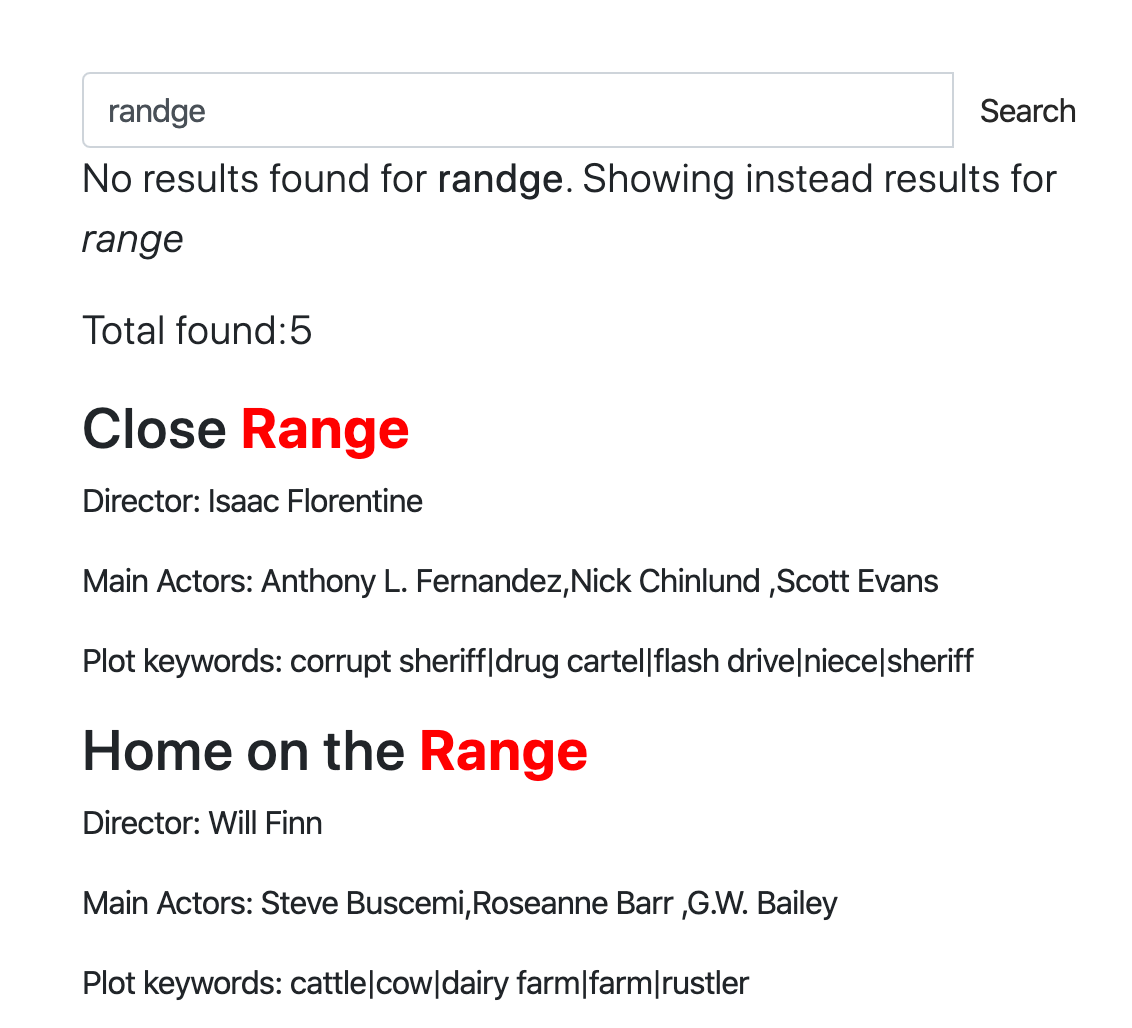
Manticore 提供了一个高级自动补全功能,能够在输入时即时给出建议,类似于知名搜索引擎的功能。这有助于加快搜索速度,让用户更快找到所需内容。
除了基本的自动补全功能外,Manticore 还包含高级功能,以提升用户体验:
- 拼写纠正(模糊匹配): Manticore 的自动补全通过使用识别并修正常见错误的算法,帮助纠正拼写错误。这意味着即使你输入错误,仍然可以找到你想找的内容。
- 键盘布局自动检测: Manticore 能自动识别你使用的键盘布局。这在多语言环境中或你意外使用了错误语言时非常有用。例如,如果你误输“ghbdtn”,Manticore 会知道你是想输入俄语的“привет”(你好),并建议正确的单词。
Manticore 的自动补全可以根据不同需求和设置定制,成为多种应用的灵活工具。

注意:
CALL AUTOCOMPLETE和/autocomplete需要安装 Manticore Buddy。如果无法使用,请确认 Buddy 已安装。
在 Manticore 中使用自动补全,请使用 CALL AUTOCOMPLETE SQL 语句或其 JSON 等价 /autocomplete。该功能基于你的索引数据提供单词补全建议。
在继续之前,请确保你打算用于自动补全的表已经开启了 infixes。
注意: 表设置中自动检查 min_infix_len,并使用30秒缓存以提高 CALL AUTOCOMPLETE 的性能。修改表后,首次调用 CALL AUTOCOMPLETE 可能会有短暂延迟(通常不明显)。仅缓存成功结果,所以如果你删除表或禁用 min_infix_len,CALL AUTOCOMPLETE 可能暂时返回错误结果,直到最终显示与 min_infix_len 相关的错误。
CALL AUTOCOMPLETE('query_beginning', 'table', [...options]);POST /autocomplete
{
"table":"table_name",
"query":"query_beginning"
[,"options": {<autocomplete options>}]
}layouts:逗号分隔的键盘布局代码字符串,用于检测由键盘布局不匹配导致的输入错误(例如错误布局下输入“ghbdtn”而非“привет”)。Manticore 会比较不同布局的字符位置以建议更正。要求至少两个布局才能有效检测不匹配。可用布局选项:us, ru, ua, se, pt, no, it, gr, uk, fr, es, dk, de, ch, br, bg, be(详细说明见 这里)。默认值:无fuzziness:0,1,或2(默认:2)。用于查找拼写错误的最大 Levenshtein 距离。设置为0可禁用模糊匹配preserve:0或1(默认:0)。设置为1时,保留搜索结果中无模糊匹配的单词(例如,“hello wrld” 返回“hello wrld”和“hello world”)。设置为0时,只返回有成功模糊匹配的单词(例如,“hello wrld” 仅返回“hello world”)。特别适用于保留短单词或可能不存在于 Manticore Search 的专有名词prepend:布尔值(SQL中为0/1)。如果为真(1),则在最后一个单词前添加星号以进行前缀扩展(例如*word)append:布尔值(SQL中为0/1)。如果为真(1),则在最后一个单词后添加星号以进行后缀扩展(例如word*)expansion_len:扩展最后一个单词的字符数。默认值:10force_bigrams:布尔值(SQL中0/1)。强制对所有单词长度使用二元组(2字符 n-gram)而非三元组,以改善针对字符转置错误的匹配。默认值:0(单词长度≥6时使用三元组)
- SQL
- SQL with no fuzzy search
- JSON
- SQL with preserve option
- JSON with preserve option
mysql> CALL AUTOCOMPLETE('hello', 'comment');
+------------+
| query      |
+------------+
| hello      |
| helio      |
| hell       |
| shell      |
| nushell    |
| powershell |
| well       |
| help       |
+------------+
mysql> CALL AUTOCOMPLETE('hello', 'comment', 0 as fuzziness);
+-------+
| query |
+-------+
| hello |
+-------+POST /autocomplete
{
"table":"comment",
"query":"hello"
}mysql> CALL AUTOCOMPLETE('hello wrld', 'comment', 1 as preserve);
+------------+
| query |
+------------+
| hello wrld |
| hello world|
+------------+POST /autocomplete
{
"table":"comment",
"query":"hello wrld",
"options": {
"preserve": 1
}
}[
{
"total": 8,
"error": "",
"warning": "",
"columns": [
{
"query": {
"type": "string"
}
}
],
"data": [
{
"query": "hello"
},
{
"query": "helio"
},
{
"query": "hell"
},
{
"query": "shell"
},
{
"query": "nushell"
},
{
"query": "powershell"
},
{
"query": "well"
},
{
"query": "help"
}
]
}
][
{
"total": 2,
"error": "",
"warning": "",
"columns": [
{
"query": {
"type": "string"
}
}
],
"data": [
{
"query": "hello wrld"
},
{
"query": "hello world"
}
]
}
]- SQL
- JSON
mysql> CALL AUTOCOMPLETE('ipohne', 'products', 1 as force_bigrams);POST /autocomplete
{
"table":"products",
"query":"ipohne",
"options": {
"force_bigrams": 1
}
}+--------+
| query |
+--------+
| iphone |
+--------+[
{
"total": 1,
"error": "",
"warning": "",
"columns": [
{
"query": {
"type": "string"
}
}
],
"data": [
{
"query": "iphone"
}
]
}
]- 此演示 演示了自动补全功能:
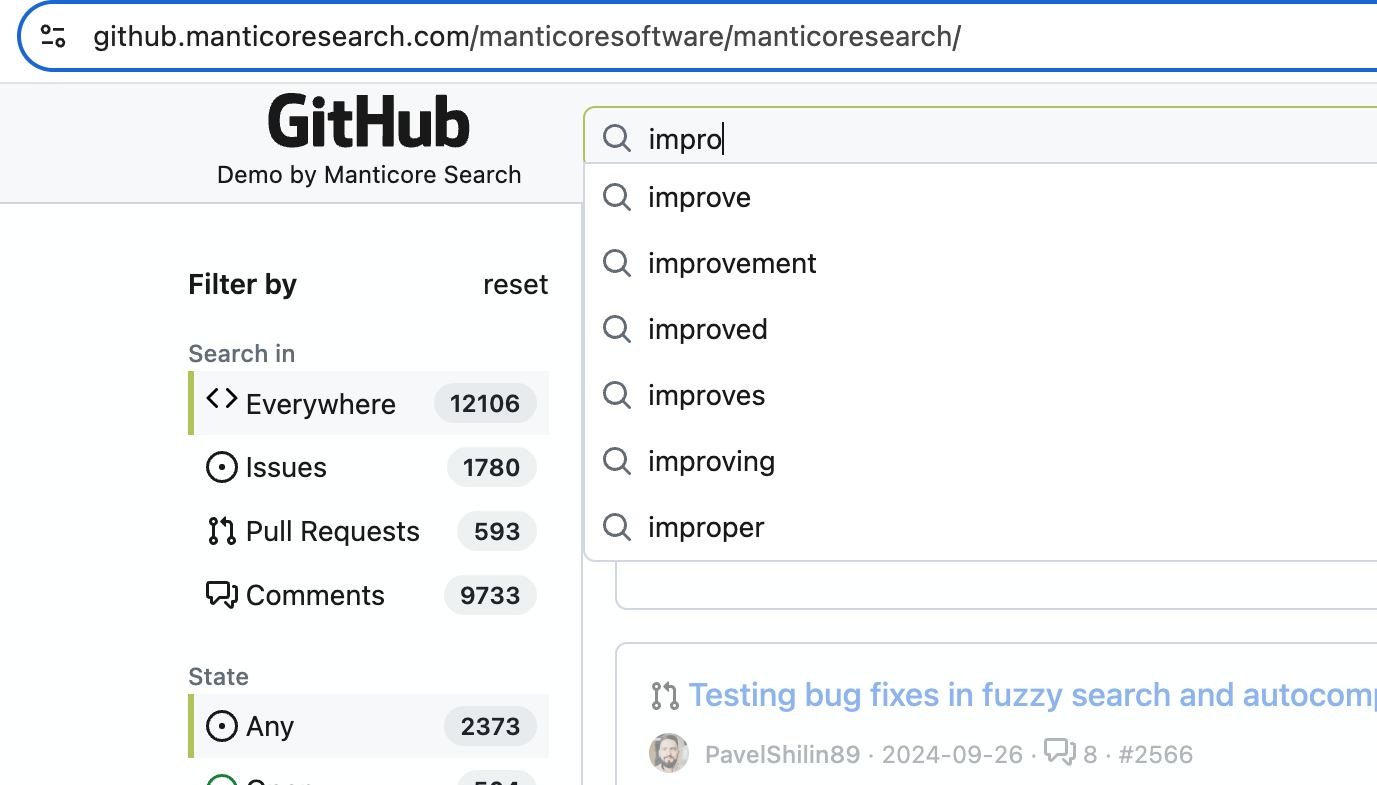
- 关于模糊搜索和自动补全的博客文章 - https://manticoresearch.com/blog/new-fuzzy-search-and-autocomplete/
尽管 CALL AUTOCOMPLETE 是大多数使用场景推荐的方法,Manticore 也支持其他可控且可自定义的方法来实现自动补全功能:
要补全一句话,可以使用 infix 搜索。你可以通过给出文档字段的开头并:
有一篇关于它的博客文章以及一个交互式课程。一个快速示例如下:
- 假设你有这样一段文档:
My cat loves my dog. The cat (Felis catus) is a domestic species of small carnivorous mammal. - 然后你可以使用
^、""和*,这样当用户输入时,你可以发出类似^"m*"、^"my *"、^"my c*"、^"my ca*"等查询 - 它将找到该文档,如果你还做了高亮,你将得到类似:
<b>My cat</b> loves my dog. The cat ( ...
在某些情况下,你只需要自动补全一个单词或几个单词。在这种情况下,你可以使用 CALL KEYWORDS。
CALL KEYWORDS 可通过 SQL 接口使用,提供了一种检查关键字如何被分词,或获取特定关键字的分词形式的方法。如果表启用了中缀,它可以快速找到给定关键字的可能结尾,适合用于自动补全功能。
这比通用的中缀搜索是一种很好的替代方案,因为它性能更高,只需使用表的字典,而不需要文档本身。
CALL KEYWORDS(text, table [, options])CALL KEYWORDS 语句将文本划分为关键字。它返回关键字的分词和规范化形式,如果需要,还可以返回关键字统计信息。此外,当表启用了词形还原器时,还会提供查询中每个关键字的位置及所有分词形式。
| 参数 | 说明 |
|---|---|
| text | 需要拆分的文本 |
| table | 用以获取文本处理设置的表名称 |
| 0/1 as stats | 是否显示关键字统计,默认是 0 |
| 0/1 as fold_wildcards | 是否折叠通配符,默认是 0 |
| 0/1 as fold_lemmas | 是否折叠形态词形,默认是 0 |
| 0/1 as fold_blended | 是否折叠混合词,默认是 0 |
| N as expansion_limit | 覆盖服务器配置中定义的expansion_limit,默认是 0(使用配置值) |
| docs/hits as sort_mode | 按 ‘docs’ 或 ‘hits’ 排序输出结果,默认不排序 |
| jieba_mode | 查询的结巴分词模式,详见jieba_mode |
以下示例展示了当用户尝试获取“my cat ...”的自动补全时它是如何工作的。因此,在应用端你只需针对每个新词建议“normalized”列中的结尾。通常使用 'hits' as sort_mode 或 'docs' as sort_mode 来排序会更合理。
- Examples
MySQL [(none)]> CALL KEYWORDS('m*', 't', 1 as stats);
+------+-----------+------------+------+------+
| qpos | tokenized | normalized | docs | hits |
+------+-----------+------------+------+------+
| 1    | m*        | my         | 1    | 2    |
| 1    | m*        | mammal     | 1    | 1    |
+------+-----------+------------+------+------+
MySQL [(none)]> CALL KEYWORDS('my*', 't', 1 as stats);
+------+-----------+------------+------+------+
| qpos | tokenized | normalized | docs | hits |
+------+-----------+------------+------+------+
| 1    | my*       | my         | 1    | 2    |
+------+-----------+------------+------+------+
MySQL [(none)]> CALL KEYWORDS('c*', 't', 1 as stats, 'hits' as sort_mode);
+------+-----------+-------------+------+------+
| qpos | tokenized | normalized  | docs | hits |
+------+-----------+-------------+------+------+
| 1    | c*        | cat         | 1    | 2    |
| 1    | c*        | carnivorous | 1    | 1    |
| 1    | c*        | catus       | 1    | 1    |
+------+-----------+-------------+------+------+
MySQL [(none)]> CALL KEYWORDS('ca*', 't', 1 as stats, 'hits' as sort_mode);
+------+-----------+-------------+------+------+
| qpos | tokenized | normalized  | docs | hits |
+------+-----------+-------------+------+------+
| 1    | ca*       | cat         | 1    | 2    |
| 1    | ca*       | carnivorous | 1    | 1    |
| 1    | ca*       | catus       | 1    | 1    |
+------+-----------+-------------+------+------+
MySQL [(none)]> CALL KEYWORDS('cat*', 't', 1 as stats, 'hits' as sort_mode);
+------+-----------+------------+------+------+
| qpos | tokenized | normalized | docs | hits |
+------+-----------+------------+------+------+
| 1    | cat*      | cat        | 1    | 2    |
| 1    | cat*      | catus      | 1    | 1    |
+------+-----------+------------+------+------+这里有一个很好的技巧可以改进上述算法——使用bigram_index。当你为表启用它时,索引中不仅包含单个词,还包含每对相邻词作为独立的词条。
这不仅能预测当前单词的结尾,还能预测下一个单词,对自动补全目标特别有益。
- Examples
MySQL [(none)]> CALL KEYWORDS('m*', 't', 1 as stats, 'hits' as sort_mode);
+------+-----------+------------+------+------+
| qpos | tokenized | normalized | docs | hits |
+------+-----------+------------+------+------+
| 1    | m*        | my         | 1    | 2    |
| 1    | m*        | mammal     | 1    | 1    |
| 1    | m*        | my cat     | 1    | 1    |
| 1    | m*        | my dog     | 1    | 1    |
+------+-----------+------------+------+------+
MySQL [(none)]> CALL KEYWORDS('my*', 't', 1 as stats, 'hits' as sort_mode);
+------+-----------+------------+------+------+
| qpos | tokenized | normalized | docs | hits |
+------+-----------+------------+------+------+
| 1    | my*       | my         | 1    | 2    |
| 1    | my*       | my cat     | 1    | 1    |
| 1    | my*       | my dog     | 1    | 1    |
+------+-----------+------------+------+------+
MySQL [(none)]> CALL KEYWORDS('c*', 't', 1 as stats, 'hits' as sort_mode);
+------+-----------+--------------------+------+------+
| qpos | tokenized | normalized         | docs | hits |
+------+-----------+--------------------+------+------+
| 1    | c*        | cat                | 1    | 2    |
| 1    | c*        | carnivorous        | 1    | 1    |
| 1    | c*        | carnivorous mammal | 1    | 1    |
| 1    | c*        | cat felis          | 1    | 1    |
| 1    | c*        | cat loves          | 1    | 1    |
| 1    | c*        | catus              | 1    | 1    |
| 1    | c*        | catus is           | 1    | 1    |
+------+-----------+--------------------+------+------+
MySQL [(none)]> CALL KEYWORDS('ca*', 't', 1 as stats, 'hits' as sort_mode);
+------+-----------+--------------------+------+------+
| qpos | tokenized | normalized         | docs | hits |
+------+-----------+--------------------+------+------+
| 1    | ca*       | cat                | 1    | 2    |
| 1    | ca*       | carnivorous        | 1    | 1    |
| 1    | ca*       | carnivorous mammal | 1    | 1    |
| 1    | ca*       | cat felis          | 1    | 1    |
| 1    | ca*       | cat loves          | 1    | 1    |
| 1    | ca*       | catus              | 1    | 1    |
| 1    | ca*       | catus is           | 1    | 1    |
+------+-----------+--------------------+------+------+
MySQL [(none)]> CALL KEYWORDS('cat*', 't', 1 as stats, 'hits' as sort_mode);
+------+-----------+------------+------+------+
| qpos | tokenized | normalized | docs | hits |
+------+-----------+------------+------+------+
| 1    | cat*      | cat        | 1    | 2    |
| 1    | cat*      | cat felis  | 1    | 1    |
| 1    | cat*      | cat loves  | 1    | 1    |
| 1    | cat*      | catus      | 1    | 1    |
| 1    | cat*      | catus is   | 1    | 1    |
+------+-----------+------------+------+------+
CALL KEYWORDS 支持分布式表,无论你的数据集多大,都能利用它的优势。
拼写校正,也称为:
- 自动更正
- 文本校正
- 修正拼写错误
- 键入容错
- “您是否是指?”
等等,是一种软件功能,可以建议或自动更正您输入的文本的替代方案。校正输入文本的概念可以追溯到1960年代,当时计算机科学家Warren Teitelman(也是“撤销”命令的发明者)引入了一种称为D.W.I.M.(“Do What I Mean”,即“按我的意图执行”)的计算哲学。Teitelman认为,计算机不应该仅被编程为接受格式完美的指令,而应该被编程为识别明显的错误。
第一个提供拼写校正功能的知名产品是1993年发布的Microsoft Word 6.0。
拼写校正可以通过几种方式实现,但需要注意的是,没有纯粹的程序化方法可以将您误输入的“ipone”高质量地转换为“iphone”。大多数情况下,系统必须基于某个数据集。数据集可以是:
- 一个正确拼写的单词字典,该字典可以是:
- 基于您的真实数据。这里的思路是,字典中大部分拼写是正确的,系统会尝试找到与输入单词最相似的单词(我们稍后将讨论如何使用Manticore实现这一点)。
- 或者基于与您的数据无关的外部字典。这里可能出现的问题是,您的数据和外部字典可能差异太大:字典中可能缺少一些单词,而您的数据中可能缺少其他单词。
- 不仅基于字典,还具备上下文感知能力,例如“white ber”会被校正为“white bear”,而“dark ber”会被校正为“dark beer”。上下文可能不仅仅是查询中的相邻单词,还可能包括您的位置、时间、当前句子的语法(例如是否将“there”更正为“their”)、您的搜索历史,以及几乎所有可能影响您意图的其他因素。
- 另一种经典方法是使用之前的搜索查询作为拼写校正的数据集。这在自动补全功能中被更广泛地使用,但对自动更正也适用。其思路是,用户在拼写上大多是正确的,因此我们可以使用他们搜索历史中的单词作为事实来源,即使我们没有在文档中使用这些单词或使用外部字典。此处也可以实现上下文感知。
Manticore提供了模糊搜索选项以及可用于自动拼写校正的命令CALL QSUGGEST和CALL SUGGEST。
模糊搜索功能通过考虑搜索查询中的细微变化或拼写错误,允许更灵活的匹配。它的工作方式类似于普通的SELECT SQL语句或/search JSON请求,但提供了额外的参数来控制模糊匹配行为。
注意:
fuzzy选项需要Manticore Buddy。如果不起作用,请确保已安装Buddy。
注意:
fuzzy选项不适用于多查询。
SELECT
  ...
  MATCH('...')
  ...
  OPTION fuzzy={0|1}
  [, distance=N]
  [, preserve={0|1}]
  [, layouts='{be,bg,br,ch,de,dk,es,fr,uk,gr,it,no,pt,ru,se,ua,us}']
}
注意:通过 SQL 执行模糊搜索时,MATCH 子句不应包含除 短语搜索运算符 之外的任何全文运算符,并且只应包含你想要匹配的词。通常会被当作运算符并需要 转义 的字符不需要手动转义,因为模糊搜索会自动为你转义。
- SQL
- SQL with additional filters
- JSON
- SQL with preserve option
- JSON with preserve option
SELECT * FROM mytable WHERE MATCH('someting') OPTION fuzzy=1, layouts='us,ua', distance=2;带有附加筛选器的更复杂模糊搜索查询示例:
SELECT * FROM mytable WHERE MATCH('someting') OPTION fuzzy=1 AND (category='books' AND price < 20);POST /search
{
"table": "test",
"query": {
"bool": {
"must": [
{
"match": {
"*": "ghbdtn"
}
}
]
}
},
"options": {
"fuzzy": true,
"layouts": ["us", "ru"],
"distance": 2
}
}SELECT * FROM mytable WHERE MATCH('hello wrld') OPTION fuzzy=1, preserve=1;POST /search
{
"table": "test",
"query": {
"bool": {
"must": [
{
"match": {
"*": "hello wrld"
}
}
]
}
},
"options": {
"fuzzy": true,
"preserve": 1
}
}+------+-------------+
| id | content |
+------+-------------+
| 1 | something |
| 2 | some thing |
+------+-------------+
2 rows in set (0.00 sec)+------+-------------+
| id | content |
+------+-------------+
| 1 | hello wrld |
| 2 | hello world |
+------+-------------+
2 rows in set (0.00 sec)POST /search
{
"table": "table_name",
"query": {
<full-text query>
},
"options": {
"fuzzy": {true|false}
[,"layouts": ["be","bg","br","ch","de","dk","es","fr","uk","gr","it","no","pt","ru","se","ua","us"]]
[,"distance": N]
[,"preserve": {0|1}]
}
}注意:如果你使用 query_string,请注意它不支持除 短语搜索运算符 之外的全文运算符。查询字符串应只包含你希望匹配的词。通常会被当作 全文运算符 的字符不需要转义,因为模糊搜索会自动为你转义。
fuzzy:启用或关闭模糊搜索。distance:设置匹配的莱文斯坦距离。默认值为2。preserve:0或1(默认:0)。当设置为1时,在搜索结果中保留没有模糊匹配的单词(例如,“hello wrld”返回“hello wrld”和“hello world”)。当设置为0时,仅返回成功模糊匹配的单词(例如,“hello wrld”仅返回“hello world”)。对于保留可能在Manticore Search中不存在的短单词或专有名词特别有用。layouts:用于检测键盘布局不匹配导致的打字错误的键盘布局(例如,使用错误布局时输入“ghbdtn”而不是“привет”)。Manticore会比较不同布局中的字符位置以建议更正。要有效检测不匹配,至少需要2种布局。默认情况下不使用任何布局。使用空字符串''(SQL)或数组[](JSON)来关闭此功能。支持的布局包括:be- 比利时AZERTY布局bg- 标准保加利亚布局br- 巴西QWERTY布局ch- 瑞士QWERTZ布局de- 德国QWERTZ布局dk- 丹麦QWERTY布局es- 西班牙QWERTY布局fr- 法国AZERTY布局uk- 英国QWERTY布局gr- 希腊QWERTY布局it- 意大利QWERTY布局no- 挪威QWERTY布局pt- 葡萄牙QWERTY布局ru- 俄语JCUKEN布局se- 瑞典QWERTY布局ua- 乌克兰JCUKEN布局us- 美国QWERTY布局
- 此演示 展示了模糊搜索功能:
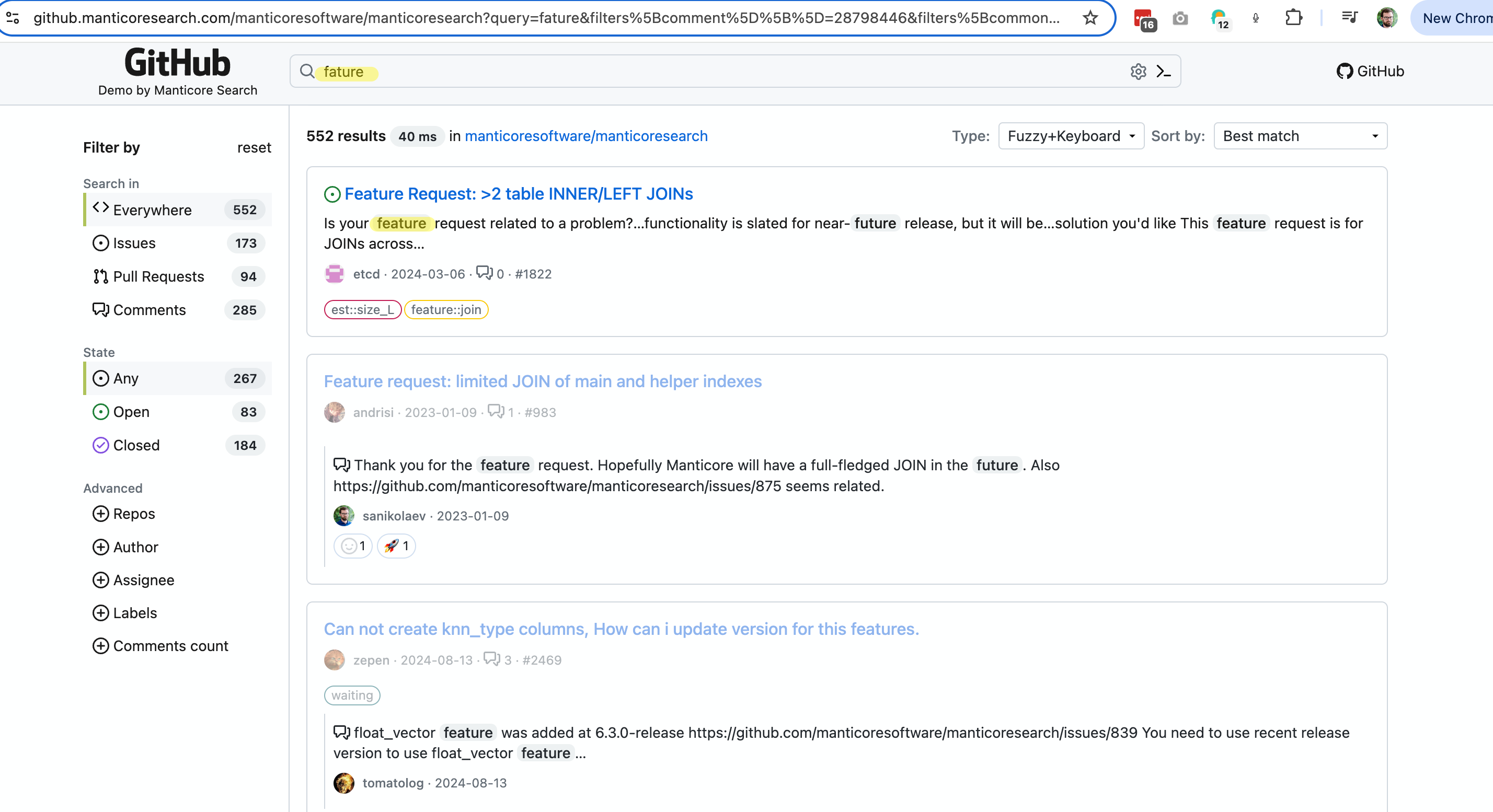
- 关于模糊搜索和自动补全的博客文章 - https://manticoresearch.com/blog/new-fuzzy-search-and-autocomplete/
这两个命令都可以通过 SQL 访问,并支持查询本地(普通和实时)和分布式表。语法如下:
CALL QSUGGEST(<word or words>, <table name> [,options])
CALL SUGGEST(<word or words>, <table name> [,options])
options: N as option_name[, M as another_option, ...]
这些命令会为给定单词提供词典中的所有建议。它们只适用于启用了 infixing 和 dict=keywords 的表。它们不适用于使用 dict=keywords_32k 的表。它们会返回建议的关键词、建议关键词与原始关键词之间的 Levenshtein 距离,以及建议关键词的文档统计信息。
如果第一个参数包含多个单词,则:
CALL QSUGGEST将仅返回 最后一个 单词的建议,忽略其余部分。CALL SUGGEST将仅返回 第一个 单词的建议。
这是它们之间唯一的区别。支持以下选项进行自定义:
| 选项 | 描述 | 默认 |
|---|---|---|
| limit | 返回 N 个最佳匹配 | 5 |
| max_edits | 仅保留与原始关键词的莱文斯坦距离小于或等于 N 的字典单词 | 4 |
| result_stats | 提供找到的单词的莱文斯坦距离和文档数量 | 1(启用) |
| delta_len | 仅保留与原始单词长度差异小于 N 的字典单词 | 3 |
| max_matches | 保留的匹配数 | 25 |
| reject | 被拒绝的单词是那些不如匹配队列中已有单词的匹配项。它们被放入一个被拒绝队列中,如果其中一个实际上可以进入匹配队列,该队列会被重置。此参数定义了被拒绝队列的大小(作为 reject*max(max_matched,limit))。如果被拒绝队列已满,引擎将停止寻找潜在匹配 | 4 |
| result_line | 通过返回所有建议、距离和文档每行显示数据的替代模式 | 0 |
| non_char | 不跳过包含非字母符号的字典单词 | 0(跳过此类单词) |
| sentence | 返回原始句子,同时将最后一个单词替换为匹配项 | 0(不返回完整句子) |
| force_bigrams | 强制使用二元组(2字符 n-gram)而不是三元组来处理所有单词长度,这可以改善具有换位错误的单词的匹配 | 0(对长度≥6的单词使用三元组) |
| search_mode | 通过在索引上执行搜索来细化建议。接受 'phrase' 用于精确短语匹配或 'words' 用于词袋匹配。启用时,添加一个 found_docs 列显示文档数量,并按 found_docs 降序、然后按 distance 升序重新排序结果 |
N/A(默认禁用) |
为了展示其工作方式,让我们创建一个表并向其中添加几个文档。
create table products(title text) min_infix_len='2';
insert into products values (0,'Crossbody Bag with Tassel'), (0,'microfiber sheet set'), (0,'Pet Hair Remover Glove');如您所见,拼写错误的单词 "crossbUdy" 会被更正为 "crossbody"。默认情况下,CALL SUGGEST/QSUGGEST 返回:
distance- 莱文斯坦距离,表示将给定单词转换为建议所需进行的编辑次数docs- 包含建议单词的文档数量
要禁用这些统计信息的显示,可以使用选项 0 as result_stats。
- Example
call suggest('crossbudy', 'products');+-----------+----------+------+
| suggest | distance | docs |
+-----------+----------+------+
| crossbody | 1 | 1 |
+-----------+----------+------+- Example
call suggest('bagg with tasel', 'products');+---------+----------+------+
| suggest | distance | docs |
+---------+----------+------+
| bag | 1 | 1 |
+---------+----------+------+- Example
CALL QSUGGEST('bagg with tasel', 'products');+---------+----------+------+
| suggest | distance | docs |
+---------+----------+------+
| tassel | 1 | 1 |
+---------+----------+------+添加 1 as sentence 会使 CALL QSUGGEST 返回整个句子,其中最后一个单词被更正。
- Example
CALL QSUGGEST('bag with tasel', 'products', 1 as sentence);+-------------------+----------+------+
| suggest | distance | docs |
+-------------------+----------+------+
| bag with tassel | 1 | 1 |
+-------------------+----------+------+1 as result_line 选项会改变建议在输出中的显示方式。与其在单独的行中显示每个建议,它会在单行中显示所有建议、距离和文档。以下是一个示例来演示这一点:
CALL QSUGGEST('bagg with tasel', 'products', 1 as result_line);+----------+--------+
| name | value |
+----------+--------+
| suggests | tassel |
| distance | 1 |
| docs | 1 |
+----------+--------+force_bigrams 选项可以帮助处理具有换位错误的单词,例如 "ipohne" 与 "iphone"。通过使用二元组而不是三元组,算法可以更好地处理字符换位。
CALL SUGGEST('ipohne', 'products', 1 as force_bigrams);+--------+----------+------+
| suggest| distance | docs |
+--------+----------+------+
| iphone | 2 | 1 |
+--------+----------+------+search_mode 选项通过在索引上执行实际搜索来增强建议,以计算每个建议短语或单词组合包含多少文档。这有助于根据实际文档的相关性而不是仅字典统计信息对建议进行排序。
该选项接受两个值:
'phrase'- 执行精确短语搜索。例如,当建议“带流苏的包”时,它会搜索精确短语"bag with tassel"并统计包含这些词作为相邻短语的文档数量。'words'- 执行词袋搜索。例如,当建议“带流苏的包”时,它会搜索bag with tassel(不带引号),并统计包含所有这些词的文档数量,无论顺序或中间是否有其他词。
注意:当
sentence被启用时(即输入包含多个词时),search_mode选项才起作用。对于单词查询,search_mode被忽略。
注意:性能考虑:每个建议候选都会触发一次独立的搜索查询。如果您需要评估许多候选,请考虑使用较低的
limit值以减少执行的搜索次数。
当启用 search_mode 时,结果会包含一个 found_docs 列,显示每个建议的文档数量,并按 found_docs 降序重新排序,然后按 distance 升序排序。
CALL QSUGGEST('bag with tasel', 'products', 1 as sentence, 'phrase' as search_mode);+-------------------+----------+------+-------------+
| suggest | distance | docs | found_docs |
+-------------------+----------+------+-------------+
| bag with tassel | 1 | 13 | 10 |
| bag with tazer | 2 | 27 | 3 |
+-------------------+----------+------+-------------+-- With phrase matching: finds exact phrases only
CALL QSUGGEST('test carp', 'products', 1 as sentence, 'phrase' as search_mode);
-- With words matching: finds documents with all words regardless of order
CALL QSUGGEST('test carp', 'products', 1 as sentence, 'words' as search_mode);-- Phrase mode results:
+----------------+----------+------+-------------+
| suggest | distance | docs | found_docs |
+----------------+----------+------+-------------+
| test car | 1 | 17 | 5 |
| test carpet | 2 | 19 | 4 |
+----------------+----------+------+-------------+
-- Words mode results (more matches for "test carpet" due to word separation):
+----------------+----------+------+-------------+
| suggest | distance | docs | found_docs |
+----------------+----------+------+-------------+
| test carpet | 2 | 19 | 19 |
| test car | 1 | 17 | 5 |
+----------------+----------+------+-------------+理解差异:
- 短语匹配 (
'phrase'):搜索精确序列。查询"test carpet"仅匹配包含这些词按此精确顺序出现的文档(例如,“test carpet cleaning”匹配,但“test the carpet”或“carpet test”不匹配)。 - 词袋匹配 (
'words'):搜索文档中包含所有词,顺序无关。查询test carpet匹配任何包含“test”和“carpet”的文档(例如,“test the carpet”、“test red carpet”、“carpet test”均匹配)。
- 这个交互式课程 展示了
CALL SUGGEST在小型网络应用中的工作方式。