当 Manticore 搜索守护进程停止且集群中没有剩余节点可提供服务时,必须进行恢复。由于用于复制的 Galera 库具有多主特性,Manticore 复制集群是一个单一的逻辑实体,它维护其节点和数据的一致性,以及整个集群的状态。这允许在多个节点上同时安全写入,确保集群的完整性。
然而,这也带来了挑战。让我们以由节点 A、B 和 C 组成的集群为例,看看当部分或全部节点不可用时需要做些什么。
当节点 A 停止时,其他节点会收到“正常关闭”消息。集群规模缩小,并进行仲裁数重新计算。
启动节点 A 时,它会加入集群,但在与集群完全同步之前不会处理任何写事务。如果捐赠者节点 B 或 C 上的写集缓存(可通过 Galera 集群的 gcache.size 控制)仍包含节点 A 错过的所有事务,节点 A 将接收一次快速增量状态转移(IST),即仅传输错过的事务。如果没有,将进行快照状态转移(SST),涉及转移表文件。
在节点 A 和 B 都停止的场景下,集群规模减少到 1,由节点 C 形成主要组件处理写事务。
然后,节点 A 和 B 可以照常启动,启动后将加入集群。节点 C 作为捐赠者,为节点 A 和 B 提供状态转移。
所有节点都已关闭,集群处于关闭状态。
现在的问题是如何初始化集群。重要的是,在 searchd 的干净关闭过程中,节点会将最后执行的事务编号写入集群目录中的 grastate.dat 文件,并带有 safe_to_bootstrap 标志。最后停止的节点会有选项 safe_to_bootstrap: 1 和最先进的 seqno 编号。
必须先启动这个节点以形成集群。要启动集群,应该使用 --new-cluster 标志在该节点上启动服务器。在 Linux 上,也可以运行 manticore_new_cluster,它将通过 systemd 以 --new-cluster 模式启动 Manticore。
如果其他节点先启动并自举集群,那么最先进的节点会加入该集群,执行完全 SST 并接收一个缺失部分事务的表文件,这与之前它所拥有的表文件不同。这就是为什么必须先启动最后关闭的节点,它在 grastate.dat 中应有 safe_to_bootstrap: 1 标志。
发生崩溃或网络故障导致节点 A 从集群消失时,节点 B 和 C 会尝试重新连接节点 A。失败后,它们会将节点 A 从集群中移除。由于三节点中的两个仍在运行,集群保持仲裁数,继续正常运行。
当节点 A 重启时,它将自动加入集群,如情况 1所述。
节点 A 和 B 离线。节点 C 无法自行形成仲裁数,因为 1 个节点小于全部 3 个节点的一半。因此,节点 C 上的集群状态变为非主要状态,拒绝任何写事务并显示错误消息。
同时,节点 C 等待其他节点连接并尝试连接它们。如果发生这种情况,网络恢复,节点 A 和 B 重新上线,集群将自动重组。如果节点 A 和 B 只是临时断开与节点 C 的连接,但它们仍能相互通信,则它们将继续正常运行,因为它们仍然形成了仲裁数。
但如果节点 A 和 B 都因断电而崩溃或重启,则必须有人使用以下命令在节点 C 上激活主组件:
- SQL
- JSON
SET CLUSTER posts GLOBAL 'pc.bootstrap' = 1POST /cli -d "
SET CLUSTER posts GLOBAL 'pc.bootstrap' = 1
"重要的是,在执行该命令之前,必须确认其他节点确实无法访问。否则,可能会发生脑裂,形成分离的集群。
所有节点崩溃。在这种情况下,集群目录中的 grastate.dat 文件未更新,且不包含有效的 seqno 序列号。
如果发生这种情况,需要有人找到数据最新的节点,并使用命令行参数 --new-cluster-force 启动该节点上的服务器。所有其他节点将按正常方式启动,如情况 3所述。
在 Linux 上,也可以使用 manticore_new_cluster --force 命令,通过 systemd 以 --new-cluster-force 模式启动 Manticore。
脑裂可能导致集群转变为非主状态。例如,考虑一个由偶数个节点(四个)组成的集群,比如位于不同数据中心的两对节点。如果网络故障中断了数据中心之间的连接,脑裂就会发生,因为每组节点恰好持有半数仲裁。结果,两组节点都停止处理写事务,因为Galera复制模型优先考虑数据一致性,没有仲裁的集群无法接受写事务。然而,两组中的节点都会尝试与另一组的节点重新连接,以努力恢复集群。
如果有人在网络恢复之前想要恢复集群,应采取案例5中概述的相同步骤,但仅在其中一组节点上执行。
执行该语句后,运行该语句的节点所在组将能够再次处理写事务。
- SQL
- JSON
SET CLUSTER posts GLOBAL 'pc.bootstrap' = 1POST /cli -d "
SET CLUSTER posts GLOBAL 'pc.bootstrap' = 1
"然而,需要注意的是,如果在两组节点上都执行该语句,将导致形成两个独立的集群,随后的网络恢复也不会使两组重新合并。
使用默认配置,Manticore 正在等待您的连接:
- 为 MySQL 客户端开放端口 9306
- 为 HTTP/HTTPS 连接开放端口 9308
- 为 HTTP/HTTPS 以及来自其他 Manticore 节点和基于 Manticore 二进制 API 的客户端开放端口 9312
- SQL
- HTTP
- PHP
- Python
- Python-asyncio
- Javascript
- Java
- C#
- Rust
- docker
mysql -h0 -P9306HTTP 是无状态协议,因此不需要任何特殊的连接阶段:
curl -s "http://localhost:9308/search"require_once __DIR__ . '/vendor/autoload.php';
$config = ['host'=>'127.0.0.1','port'=>9308];
$client = new \Manticoresearch\Client($config);import manticoresearch
config = manticoresearch.Configuration(
host = "http://127.0.0.1:9308"
)
client = manticoresearch.ApiClient(config)
indexApi = manticoresearch.IndexApi(client)
searchApi = manticoresearch.searchApi(client)
utilsApi = manticoresearch.UtilsApi(client)import manticoresearch
config = manticoresearch.Configuration(
host = "http://127.0.0.1:9308"
)
async with manticoresearch.ApiClient(config) as client:
indexApi = manticoresearch.IndexApi(client)
searchApi = manticoresearch.searchApi(client)
utilsApi = manticoresearch.UtilsApi(client)var Manticoresearch = require('manticoresearch');
var client= new Manticoresearch.ApiClient()
client.basePath="http://127.0.0.1:9308";
indexApi = new Manticoresearch.IndexApi(client);
searchApi = new Manticoresearch.SearchApi(client);
utilsApi = new Manticoresearch.UtilsApi(client);import com.manticoresearch.client.ApiClient;
import com.manticoresearch.client.ApiException;
import com.manticoresearch.client.Configuration;
import com.manticoresearch.client.model.*;
import com.manticoresearch.client.api.IndexApi;
import com.manticoresearch.client.api.UtilsApi;
import com.manticoresearch.client.api.SearchApi;
ApiClient client = Configuration.getDefaultApiClient();
client.setBasePath("http://127.0.0.1:9308");
IndexApi indexApi = new IndexApi(client);
SearchApi searchApi = new UtilsApi(client);
UtilsApi utilsApi = new UtilsApi(client);using ManticoreSearch.Client;
using ManticoreSearch.Api;
using ManticoreSearch.Model;
string basePath = "http://127.0.0.1:9308";
IndexApi indexApi = new IndexApi(basePath);
SearchApi searchApi = new UtilsApi(basePath);
UtilsApi utilsApi = new UtilsApi(basePath);use std::sync::Arc;
use manticoresearch::{
apis::{
{configuration::Configuration,IndexApi,IndexApiClient,SearchApi,SearchApiClient,UtilsApi,UtilsApiClient}
},
};
async fn maticore_connect {
let configuration = Configuration {
base_path: "http://127.0.0.1:9308".to_owned(),
..Default::default(),
};
let api_config = Arc::new(configuration);
let utils_api = UtilsApiClient::new(api_config.clone());
let index_api = IndexApiClient::new(api_config.clone());
let search_api = SearchApiClient::new(api_config.clone());运行 Manticore 容器并使用内置的 MySQL 客户端连接到节点。
docker run --name manticore -d manticoresearch/manticore && docker exec -it manticore mysqlManticore Search 通过使用 MySQL 协议实现了 SQL 接口,允许使用任何 MySQL 库或连接器以及许多 MySQL 客户端连接到 Manticore Search,并像使用 MySQL 服务器一样操作它,而非直接操作 Manticore。
然而,SQL 方言有所不同,仅实现了 MySQL 中可用的 SQL 命令或函数的一个子集。此外,还存在 Manticore Search 特有的子句和函数,例如用于全文搜索的 MATCH() 子句。
Manticore Search 不支持服务器端的预准备语句,但可以使用客户端预准备语句。需要注意的是,Manticore 实现了多值(MVA)数据类型,这在 MySQL 或实现预准备语句的库中没有对应类型。在这些情况下,MVA 值必须在原始查询中构造。
部分 MySQL 客户端/连接器需要用户/密码和/或数据库名称的值。由于 Manticore Search 没有数据库概念,也没有实现用户访问控制,这些值可以随意设置,因为 Manticore 会直接忽略它们。
SQL 接口的默认端口是 9306,且默认启用。
你可以在配置文件的 searchd 部分,使用 listen 指令配置 MySQL 端口,格式如下:
searchd {
...
listen = 127.0.0.1:9306:mysql
...
}
请记住,Manticore 没有用户认证功能,所以请确保 MySQL 端口不会被网络外的人访问。
可以使用单独的 MySQL 端口执行“VIP”连接。连接到此端口时,将绕过线程池,总是创建一个新的专用线程。这在严重过载的情况下非常有用,避免服务器停滞或阻止通过常规端口的连接。
searchd {
...
listen = 127.0.0.1:9306:mysql
listen = 127.0.0.1:9307:mysql_vip
...
}
连接 Manticore 最简单的方法是使用标准的 MySQL 客户端:
mysql -P9306 -h0
MySQL 协议支持SSL 加密。可以在同一个 mysql 监听端口上建立安全连接。
MySQL 连接支持压缩,客户默认即可使用。客户端只需指定连接应使用压缩即可。
下面是一个使用 MySQL 客户端的示例:
mysql -P9306 -h0 -C
压缩可用于安全连接和非安全连接。
官方 MySQL 连接器可用于连接 Manticore Search ,但可能需要在 DSN 字符串中传递某些设置,因为连接器可能会尝试执行 Manticore 尚未实现的某些 SQL 命令。
JDBC 6.x 及以上版本的连接器要求 Manticore Search 版本为 2.8.2 或更高,且 DSN 字符串应包含以下选项:
jdbc:mysql://IP:PORT/DB/?characterEncoding=utf8&maxAllowedPacket=512000&serverTimezone=XXX
默认情况下,Manticore Search 会向连接器报告自己的版本,但这可能导致一些问题。为解决该问题,应在配置文件的 searchd 部分设置 mysql_version_string 指令,将版本设为低于 5.1.1 的版本:
searchd {
...
mysql_version_string = 5.0.37
...
}
.NET MySQL 连接器默认使用连接池。为了正确获取 SHOW META 的统计信息,应将查询与 SHOW META 命令作为单个多语句发送(SELECT ...;SHOW META)。如果启用连接池,需在连接字符串中添加选项 Allow Batch=True 以允许多语句:
Server=127.0.0.1;Port=9306;Database=somevalue;Uid=somevalue;Pwd=;Allow Batch=True;
可以通过 ODBC 访问 Manticore。建议在 ODBC 字符串中设置 charset=UTF8。部分 ODBC 驱动不喜欢 Manticore 服务器报告的版本,因为它们将其视为非常旧的 MySQL 服务器。该版本信息可通过 mysql_version_string 选项覆盖。
基于 MySQL 的 Manticore SQL 支持 C 风格注释语法。所有从开启符 /* 到关闭符 */ 的内容都会被忽略。注释可以跨多行,不能嵌套,且不应被记录。MySQL 特有的 /*! ... */ 注释目前也被忽略。(注释支持主要是为了更好地兼容 mysqldump 生成的转储文件,而非增强 Manticore 与 MySQL 之间的一般查询互操作性。)
SELECT /*! SQL_CALC_FOUND_ROWS */ col1 FROM table1 WHERE ...
您可以通过 HTTP/HTTPS 连接到 Manticore Search。
默认情况下,Manticore 在端口 9308 和 9312 上监听 HTTP、HTTPS 和二进制请求。
在配置文件的 "searchd" 部分,您可以使用 listen 指令定义 HTTP 端口,如下所示:
这两行都是有效的,含义相同(除了端口号)。它们都定义了将为所有 API/HTTP/HTTPS 协议提供服务的监听器。没有特殊要求,任何 HTTP 客户端都可以用来连接到 Manticore。
- HTTP
searchd {
...
listen = 127.0.0.1:9308
listen = 127.0.0.1:9312:http
...
}所有 HTTP 端点返回 application/json 内容类型。大多数端点使用 JSON 负载进行请求。然而,有一些例外情况使用 NDJSON 或简单的 URL 编码负载。
目前没有用户认证。因此,请确保 HTTP 接口在您的网络之外不可访问。由于 Manticore 的功能与其他 Web 服务器类似,您可以使用反向代理(如 Nginx)来实现 HTTP 认证或缓存。
HTTP 协议也支持 SSL 加密:
如果您指定 :https 而不是 :http,仅接受安全连接。否则,如果未提供有效的密钥/证书,但客户端尝试通过 HTTPS 连接,连接将被丢弃。如果您向 9443 发送非 HTTPS 的 HTTP 请求,它将返回 HTTP 状态码 400。
- HTTPS
searchd {
...
listen = 127.0.0.1:9308
listen = 127.0.0.1:9443:https
...
}可以使用单独的 HTTP 接口进行“VIP”连接。在这种情况下,连接会绕过线程池,始终创建一个新的专用线程。这在服务器可能停滞或不允许常规端口连接的严重过载期间管理 Manticore Search 时很有用。
有关 listen 指令的更多信息,请参见此部分。
- VIP
searchd {
...
listen = 127.0.0.1:9308
listen = 127.0.0.1:9318:_vip
...
}Manticore 提供了 /sql、/cli 和 /cli_json 端点,用于通过 HTTP 运行 SQL 查询。每个端点都设计用于特定的使用场景:
/sql:适用于从应用程序进行编程使用。/sql端点仅接受 SELECT 语句,并以 HTTP JSON 格式返回响应。/sql?mode=raw端点接受任何 SQL 查询,并以类似于通过 mysql 接收的原始格式返回响应。
/cli:仅适用于手动使用(例如通过 curl 或浏览器)。不推荐用于脚本。/cli_json:类似于/cli,但以 JSON 格式返回结果。不推荐用于脚本。
一般语法:
curl "localhost:6780/sql[?mode=raw]&query={URL_ENCODED_QUERY}"curl localhost:6780/sql[?mode=raw] -d "[query={URL_ENCODED_QUERY}|{NOT_URL_ENCODED_QUERY}]"
/sql 端点通过 HTTP JSON 接口接受 SQL 查询:
该端点可以使用 GET 或 POST 方法处理 HTTP 请求。发送查询时,您可以:
- 使用 GET: 在 URL 的
query参数中包含查询,例如/sql?query=your_encoded_query_here。重要的是要对这个参数进行 URL 编码,以避免错误,特别是如果查询包含=符号,这可能会被解释为 URL 语法的一部分,而不是查询的一部分。 - 使用 POST: 您也可以在 POST 请求的正文中发送查询。使用此方法时:
- 如果您以名为
query的参数发送查询,请确保对其进行 URL 编码。 - 如果您直接以纯文本(原始 POST 正文)发送查询,不要进行 URL 编码。这在查询较长或较复杂,或者查询存储在文件中且您希望按原样发送时很有用,只需将 HTTP 客户端(例如
curl)指向它即可。
- 如果您以名为
这种方法保持了 GET 和 POST 的使用方式不同,并避免了在单个请求中混合方法的混淆。
不带 mode=raw 时,响应是一个包含命中信息和执行时间的 JSON。响应格式与 json/search 端点相同。请注意,/sql 端点仅支持单个搜索请求。要处理多个查询,请参见下面关于 raw 模式 的部分。
- POST
- POST URL-encoded
- GET URL-encoded
POST /sql
select id,subject,author_id from forum where match('@subject php manticore') group by author_id order by id desc limit 0,5POST /sql query=select%20id%2Csubject%2Cauthor_id%20%20from%20forum%20where%20match%28%27%40subject%20php%20manticore%27%29%20group%20by%20author_id%20order%20by%20id%20desc%20limit%200%2C5GET /sql?query=select%20id%2Csubject%2Cauthor_id%20%20from%20forum%20where%20match%28%27%40subject%20php%20manticore%27%29%20group%20by%20author_id%20order%20by%20id%20desc%20limit%200%2C5{
"took": 0,
"timed_out": false,
"hits": {
"total": 2,
"total_relation": "eq",
"hits": [
{
"_id": 2,
"_score": 2356,
"_source": {
"subject": "php manticore",
"author_id": 12
}
},
{
"_id": 1,
"_score": 2356,
"_source": {
"subject": "php manticore",
"author_id": 11
}
}
]
}
}{
"took": 0,
"timed_out": false,
"hits": {
"total": 2,
"total_relation": "eq",
"hits": [
{
"_id": 2,
"_score": 2356,
"_source": {
"subject": "php manticore",
"author_id": 12
}
},
{
"_id": 1,
"_score": 2356,
"_source": {
"subject": "php manticore",
"author_id": 11
}
}
]
}
}{
"took": 0,
"timed_out": false,
"hits": {
"total": 2,
"total_relation": "eq",
"hits": [
{
"_id": 2,
"_score": 2356,
"_source": {
"subject": "php manticore",
"author_id": 12
}
},
{
"_id": 1,
"_score": 2356,
"_source": {
"subject": "php manticore",
"author_id": 11
}
}
]
}
}/sql 端点还包括一个特殊的 "raw" 模式,允许您发送 任何有效的 SQL 查询,包括多查询。响应是一个包含一个或多个结果集的 JSON 数组。您可以通过使用选项 mode=raw 启用此模式。
- POST
- POST URL-encoded
- POST URL-encoded 2nd way
- GET URL-encoded
- curl examples
POST /sql?mode=raw
desc testPOST /sql?mode=raw
query=desc%20testPOST /sql
mode=raw&query=desc%20testGET /sql?mode=raw&query=desc%20test# POST:
curl localhost:9308/sql?mode=raw -d 'SHOW TABLES'
# POST, URL-encoded:
curl localhost:9308/sql?mode=raw -d 'query=SHOW%20TABLES'
# POST, URL-encoded, 2nd way:
curl localhost:9308/sql -d 'mode=raw&query=SHOW%20TABLES'
# POST, URL-non-encoded:
curl localhost:9308/sql -d 'mode=raw&query=SHOW TABLES'[
{
"columns": [
{
"Field": {
"type": "string"
}
},
{
"Type": {
"type": "string"
}
},
{
"Properties": {
"type": "string"
}
}
],
"data": [
{
"Field": "id",
"Type": "bigint",
"Properties": ""
},
{
"Field": "title",
"Type": "text",
"Properties": "indexed"
},
{
"Field": "gid",
"Type": "uint",
"Properties": ""
},
{
"Field": "title",
"Type": "string",
"Properties": ""
},
{
"Field": "j",
"Type": "json",
"Properties": ""
},
{
"Field": "new1",
"Type": "uint",
"Properties": ""
}
],
"total": 6,
"error": "",
"warning": ""
}
][
{
"columns": [
{
"Field": {
"type": "string"
}
},
{
"Type": {
"type": "string"
}
},
{
"Properties": {
"type": "string"
}
}
],
"data": [
{
"Field": "id",
"Type": "bigint",
"Properties": ""
},
{
"Field": "title",
"Type": "text",
"Properties": "indexed"
},
{
"Field": "gid",
"Type": "uint",
"Properties": ""
},
{
"Field": "title",
"Type": "string",
"Properties": ""
},
{
"Field": "j",
"Type": "json",
"Properties": ""
},
{
"Field": "new1",
"Type": "uint",
"Properties": ""
}
],
"total": 6,
"error": "",
"warning": ""
}
][
{
"columns": [
{
"Field": {
"type": "string"
}
},
{
"Type": {
"type": "string"
}
},
{
"Properties": {
"type": "string"
}
}
],
"data": [
{
"Field": "id",
"Type": "bigint",
"Properties": ""
},
{
"Field": "title",
"Type": "text",
"Properties": "indexed"
},
{
"Field": "gid",
"Type": "uint",
"Properties": ""
},
{
"Field": "title",
"Type": "string",
"Properties": ""
},
{
"Field": "j",
"Type": "json",
"Properties": ""
},
{
"Field": "new1",
"Type": "uint",
"Properties": ""
}
],
"total": 6,
"error": "",
"warning": ""
}
][
{
"columns": [
{
"Field": {
"type": "string"
}
},
{
"Type": {
"type": "string"
}
},
{
"Properties": {
"type": "string"
}
}
],
"data": [
{
"Field": "id",
"Type": "bigint",
"Properties": ""
},
{
"Field": "title",
"Type": "text",
"Properties": "indexed"
},
{
"Field": "gid",
"Type": "uint",
"Properties": ""
},
{
"Field": "title",
"Type": "string",
"Properties": ""
},
{
"Field": "j",
"Type": "json",
"Properties": ""
},
{
"Field": "new1",
"Type": "uint",
"Properties": ""
}
],
"total": 6,
"error": "",
"warning": ""
}
]注意:
/cli需要 Manticore Buddy。如果不起作用,请确保已安装 Buddy。
注意:
/cli端点旨在使用 curl 或浏览器等工具手动与 Manticore 交互。它不适用于自动化脚本。请改用/sql端点。
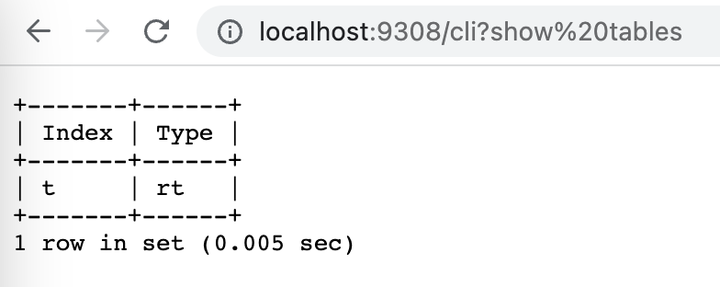
虽然 /sql 端点对于从您的应用程序以编程方式控制 Manticore 非常有用,但还有一个 /cli 端点。这使得通过 curl 或浏览器手动维护 Manticore 实例更加容易。它接受 POST 和 GET HTTP 方法。/cli? 之后输入的所有内容都会被 Manticore 理解,即使没有通过 curl 手动转义或浏览器自动编码。不需要 query 参数。重要的是,+ 符号不会被转换为空格,因此无需对其进行编码。对于 POST 方法,Manticore 会原样接受所有内容,不会做任何更改。响应以表格格式呈现,类似于您在 MySQL 客户端中可能看到的 SQL 结果集。
- POST
- GET
- Browser
- curl example
POST /cli
desc testGET /cli?desc%20test
curl 0:9308/cli -d 'desc test'+-------+--------+----------------+
| Field | Type | Properties |
+-------+--------+----------------+
| id | bigint | |
| body | text | indexed stored |
| title | string | |
+-------+--------+----------------+
3 rows in set (0.001 sec)+-------+--------+----------------+
| Field | Type | Properties |
+-------+--------+----------------+
| id | bigint | |
| body | text | indexed stored |
| title | string | |
+-------+--------+----------------+
3 rows in set (0.001 sec)+-------+--------+----------------+
| Field | Type | Properties |
+-------+--------+----------------+
| id | bigint | |
| title | text | indexed stored |
+-------+--------+----------------+
2 rows in set (0.001 sec)注意:/cli_json 端点是为使用 curl 或浏览器等工具手动与 Manticore 交互而设计的。它不适用于自动化脚本。请改用 /sql 端点。
/cli_json 端点提供的功能与 /cli 相同,但响应格式为 JSON。它包括:
columns部分,描述模式。data部分,包含实际数据。- 包含 "total"、"error" 和 "warning" 的摘要部分。
- POST
- GET
- curl example
POST /cli_json
desc testGET /cli_json?desc%20testcurl 0:9308/cli_json -d 'desc test'[
{
"columns":[
{
"Field":{
"type":"string"
}
},
{
"Type":{
"type":"string"
}
},
{
"Properties":{
"type":"string"
}
}
],
"data":[
{
"Field":"id",
"Type":"bigint",
"Properties":""
},
{
"Field":"body",
"Type":"text",
"Properties":"indexed stored"
},
{
"Field":"title",
"Type":"string",
"Properties":""
}
],
"total":3,
"error":"",
"warning":""
}
][
{
"columns":[
{
"Field":{
"type":"string"
}
},
{
"Type":{
"type":"string"
}
},
{
"Properties":{
"type":"string"
}
}
],
"data":[
{
"Field":"id",
"Type":"bigint",
"Properties":""
},
{
"Field":"body",
"Type":"text",
"Properties":"indexed stored"
},
{
"Field":"title",
"Type":"string",
"Properties":""
}
],
"total":3,
"error":"",
"warning":""
}
][{
"columns":[{"Field":{"type":"string"}},{"Type":{"type":"string"}},{"Properties":{"type":"string"}}],
"data":[
{"Field":"id","Type":"bigint","Properties":""},
{"Field":"body","Type":"text","Properties":"indexed stored"},
{"Field":"title","Type":"string","Properties":""}
],
"total":3,
"error":"",
"warning":""
}]持久连接意味着客户端保持 TCP 连接打开,并通过该连接发送多个查询,而不是为每个查询打开新连接。这避免了重复的名称解析和连接设置,并允许守护进程保留每个连接的状态,例如元信息和查询配置文件。
在 HTTP/1.0 中,添加 Connection: keep-alive 以请求持久连接。
在 HTTP/1.1 中,连接默认是持久的。在最后一个请求上发送 Connection: close 以明确结束会话。
在持久连接上,守护进程会保留一些状态,后续查询可以使用这些状态。此状态对于 /sql、/sql?mode=raw 和 /cli_json 端点是保留的,但不适用于 /cli。这使得可以通过 HTTP JSON 进行有状态的交互。例如,当您使用 /cli_json 时,可以在同一连接上 SELECT 之后运行 SHOW META,类似于使用 MySQL 客户端。
要通过一个连接使用 sphinxql 运行多个查询,您需要使用 curl 的 --next 键将命令链接起来:
curl -s localhost:9312/cli_json -d "CALL PQ ('pq', ('{"title":"angry", "gid":3 }'))" --next localhost:9312/cli_json -d 'show meta'
但是请注意,以下内容将**无法工作**:
curl -s localhost:9312/cli_json -d "CALL PQ ('pq', ('{"title":"angry", "gid":3 }')); show meta"
这是因为 Manticore 将分号分隔的 SQL 批处理视为 %多查询 [../Searching/Multi-queries.md] %,它有自己的行为和限制。
This is because Manticore treats a semicolon-separated SQL batch as a multi-query, which has its own behavior and limitations.