Фасетный поиск так же важен для современного поискового приложения, как автодополнение, исправление орфографии и подсветка ключевых слов поиска, особенно в электронной коммерции.
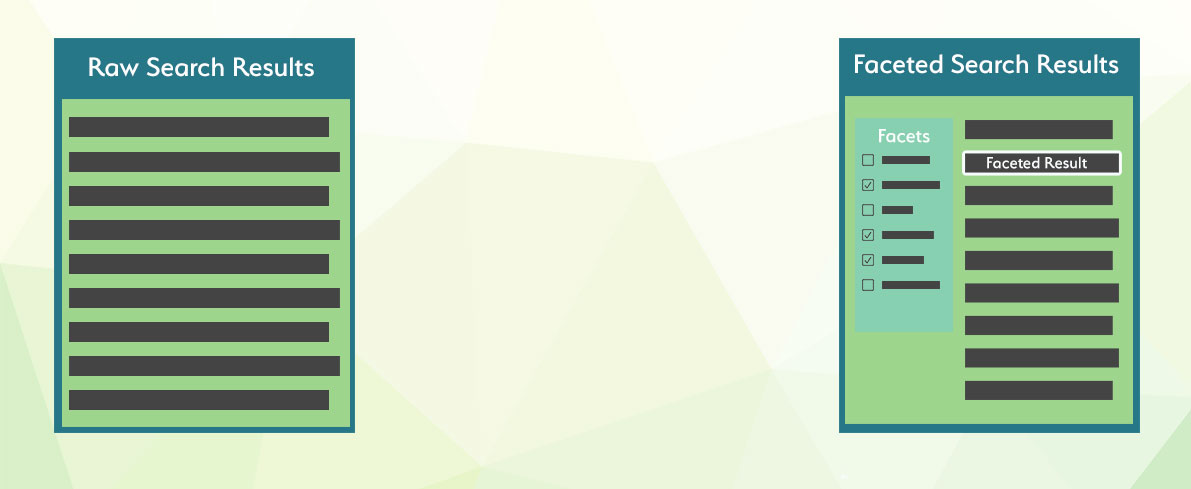
Фасетный поиск полезен при работе с большими объемами данных и различными взаимосвязанными свойствами, такими как размер, цвет, производитель или другие факторы. При запросе огромных объемов данных результаты поиска часто включают множество записей, не соответствующих ожиданиям пользователя. Фасетный поиск позволяет конечному пользователю явно определить критерии, которым должны соответствовать его результаты поиска.
В Manticore Search есть оптимизация, которая сохраняет набор результатов исходного запроса и повторно использует его для каждого расчета фасета. Поскольку агрегации применяются к уже вычисленному подмножеству документов, они выполняются быстро, и общее время выполнения часто может быть лишь немного больше, чем у первоначального запроса. Фасеты могут быть добавлены к любому запросу, и фасетом может быть любой атрибут или выражение. Результат фасета включает значения фасета и количество фасетов. Доступ к фасетам можно получить с помощью оператора SQL SELECT, объявив их в самом конце запроса.
Значения фасета могут происходить из атрибута, свойства JSON внутри атрибута JSON или выражения. Значения фасета также могут иметь псевдонимы, но псевдоним должен быть уникальным во всех наборах результатов (основной набор результатов запроса и другие наборы результатов фасетов). Значение фасета получается из агрегированного атрибута/выражения, но также может происходить из другого атрибута/выражения.
FACET {expr_list} [BY {expr_list}] [ALL FILTERS | FILTERS {expr_list} | EXCLUDE FILTERS {expr_list}] [ZEROES] [MODE {strict | auto | max}] [DISTINCT {field_name}] [ORDER BY {expr | FACET()} {ASC | DESC}] [LIMIT [offset,] count]Несколько объявлений фасетов должны быть разделены пробелом.
Фасеты могут быть определены в узле aggs:
     "aggs" :
     {
        "group name" :
         {
            "terms" :
             {
              "field":"attribute name",
              "size": 1000
             }
             "sort": [ {"attribute name": { "order":"asc" }} ]
         }
     }
где:
group name- это псевдоним, присвоенный агрегацииfieldдолжен содержать имя атрибута или выражения, по которому выполняется фасетирование- необязательный
sizeуказывает максимальное количество групп для включения в результат. Если не указан, наследует лимит основного запроса. Подробнее можно узнать в разделе Размер результата фасета. - необязательный
sortуказывает массив атрибутов и/или дополнительных свойств, используя тот же синтаксис, что и параметр "sort" в основном запросе. - необязательный верхнеуровневый
facet_filter_modeуправляет тем, как все агрегации наследуют фильтры из основного запроса. Поддерживаемые значения:strict,autoиmax. Это настройка на уровне запроса в SQL (OPTION facet_filter_mode='...') и верхнеуровневая настройка в JSON. - необязательный
modeна уровне одной агрегации переопределяет унаследованный режим для этой агрегации. Поддерживаемые значения:strict,autoиmax. Этот ключ есть только в JSON и не является псевдонимомfacet_filter_mode. В SQL эквивалентное переопределение для одного facet задается ключевым словомMODEвнутри предложенияFACET. - необязательный
filtersна уровне одной агрегации явно перечисляет, какие фильтры атрибутов основного запроса нужно применить к этой агрегации. В SQL эквивалентное предложение —FILTERS .... - необязательный
exclude_filtersна уровне одной агрегации явно перечисляет, какие фильтры атрибутов основного запроса не нужно применять к этой агрегации. Этот ключ есть только в JSON; в SQL эквивалентное предложение —EXCLUDE FILTERS .... - необязательный
zeroesна уровне одной агрегации включает корзины с нулевым счетчиком в режимеmax. В SQL эквивалентное ключевое слово для одного facet —ZEROES. Если в SQL в режимеmaxнужны отфильтрованные видимые счетчики и одновременно широкие корзины с нулевым счетчиком, используйтеOPTION facet_filter_mode='max' ... FACET ... ALL FILTERS ZEROES. - наборы результатов фасетов
autoиmaxмогут включать маркер группыstatus. Возвращаемые значения:selected,availableиunavailable.
Набор результатов будет содержать узел aggregations с возвращенными фасетами, где key - это агрегированное значение, а doc_count - количество агрегаций.
    "aggregations": {
        "group name": {
        "buckets": [
            {
                "key": 10,
                "doc_count": 1019
            },
            {
                "key": 9,
                "doc_count": 954
            },
            {
                "key": 8,
                "doc_count": 1021
            },
            {
                "key": 7,
                "doc_count": 1011
            },
            {
                "key": 6,
                "doc_count": 997
            }
            ]
        }
}- SQL
- JSON
- PHP
- Python
- Python-asyncio
- Javascript
- Java
- C#
- Rust
- TypeScript
- Go
SELECT *, price AS aprice FROM facetdemo LIMIT 10 FACET price LIMIT 10 FACET brand_id LIMIT 5;+------+-------+----------+---------------------+------------+-------------+---------------------------------------+------------+--------+
| id | price | brand_id | title | brand_name | property | j | categories | aprice |
+------+-------+----------+---------------------+------------+-------------+---------------------------------------+------------+--------+
| 1 | 306 | 1 | Product Ten Three | Brand One | Six_Ten | {"prop1":66,"prop2":91,"prop3":"One"} | 10,11 | 306 |
| 2 | 400 | 10 | Product Three One | Brand Ten | Four_Three | {"prop1":69,"prop2":19,"prop3":"One"} | 13,14 | 400 |
...
| 9 | 560 | 6 | Product Two Five | Brand Six | Eight_Two | {"prop1":90,"prop2":84,"prop3":"One"} | 13,14 | 560 |
| 10 | 229 | 9 | Product Three Eight | Brand Nine | Seven_Three | {"prop1":84,"prop2":39,"prop3":"One"} | 12,13 | 229 |
+------+-------+----------+---------------------+------------+-------------+---------------------------------------+------------+--------+
10 rows in set (0.00 sec)
+-------+----------+
| price | count(*) |
+-------+----------+
| 306 | 7 |
| 400 | 13 |
...
| 229 | 9 |
| 595 | 10 |
+-------+----------+
10 rows in set (0.00 sec)
+----------+----------+
| brand_id | count(*) |
+----------+----------+
| 1 | 1013 |
| 10 | 998 |
| 5 | 1007 |
| 8 | 1033 |
| 7 | 965 |
+----------+----------+
5 rows in set (0.00 sec)Данные могут быть фасетированы путем агрегации другого атрибута или выражения. Например, если документы содержат как идентификатор бренда, так и его название, мы можем вернуть в фасете названия брендов, но агрегировать идентификаторы брендов. Это можно сделать с помощью FACET {expr1} BY {expr2}
- SQL
- JSON
SELECT * FROM facetdemo FACET brand_name by brand_id;+------+-------+----------+---------------------+-------------+-------------+---------------------------------------+------------+
| id | price | brand_id | title | brand_name | property | j | categories |
+------+-------+----------+---------------------+-------------+-------------+---------------------------------------+------------+
| 1 | 306 | 1 | Product Ten Three | Brand One | Six_Ten | {"prop1":66,"prop2":91,"prop3":"One"} | 10,11 |
| 2 | 400 | 10 | Product Three One | Brand Ten | Four_Three | {"prop1":69,"prop2":19,"prop3":"One"} | 13,14 |
....
| 19 | 855 | 1 | Product Seven Two | Brand One | Eight_Seven | {"prop1":63,"prop2":78,"prop3":"One"} | 10,11,12 |
| 20 | 31 | 9 | Product Four One | Brand Nine | Ten_Four | {"prop1":79,"prop2":42,"prop3":"One"} | 12,13,14 |
+------+-------+----------+---------------------+-------------+-------------+---------------------------------------+------------+
20 rows in set (0.00 sec)
+-------------+----------+
| brand_name | count(*) |
+-------------+----------+
| Brand One | 1013 |
| Brand Ten | 998 |
| Brand Five | 1007 |
| Brand Nine | 944 |
| Brand Two | 990 |
| Brand Six | 1039 |
| Brand Three | 1016 |
| Brand Four | 994 |
| Brand Eight | 1033 |
| Brand Seven | 965 |
+-------------+----------+
10 rows in set (0.00 sec)Если вам нужно удалить дубликаты из групп, возвращаемых FACET, вы можете использовать DISTINCT field_name, где field_name - это поле, по которому вы хотите выполнить дедупликацию. Это также может быть id (который используется по умолчанию), если вы выполняете запрос FACET к распределенной таблице и не уверены, есть ли у вас уникальные идентификаторы в таблицах (таблицы должны быть локальными и иметь одинаковую схему).
Если у вас несколько объявлений FACET в запросе, field_name должен быть одинаковым во всех них.
DISTINCT возвращает дополнительный столбец count(distinct ...) перед столбцом count(*), позволяя получить оба результата без необходимости делать другой запрос.
- SQL
- JSON
SELECT brand_name, property FROM facetdemo FACET brand_name distinct property;+-------------+----------+
| brand_name | property |
+-------------+----------+
| Brand Nine | Four |
| Brand Ten | Four |
| Brand One | Five |
| Brand Seven | Nine |
| Brand Seven | Seven |
| Brand Three | Seven |
| Brand Nine | Five |
| Brand Three | Eight |
| Brand Two | Eight |
| Brand Six | Eight |
| Brand Ten | Four |
| Brand Ten | Two |
| Brand Four | Ten |
| Brand One | Nine |
| Brand Four | Eight |
| Brand Nine | Seven |
| Brand Four | Five |
| Brand Three | Four |
| Brand Four | Two |
| Brand Four | Eight |
+-------------+----------+
20 rows in set (0.00 sec)
+-------------+--------------------------+----------+
| brand_name | count(distinct property) | count(*) |
+-------------+--------------------------+----------+
| Brand Nine | 3 | 3 |
| Brand Ten | 2 | 3 |
| Brand One | 2 | 2 |
| Brand Seven | 2 | 2 |
| Brand Three | 3 | 3 |
| Brand Two | 1 | 1 |
| Brand Six | 1 | 1 |
| Brand Four | 4 | 5 |
+-------------+--------------------------+----------+
8 rows in set (0.00 sec)Фасеты могут агрегировать по выражениям. Классический пример - сегментация цен по определенным диапазонам:
- SQL
- JSON
- PHP
- Python
- Python-asyncio
- Javascript
- Java
- C#
- Rust
- TypeScript
- Go
SELECT * FROM facetdemo FACET INTERVAL(price,200,400,600,800) AS price_range ;+------+-------+----------+---------------------+-------------+-------------+---------------------------------------+------------+-------------+
| id | price | brand_id | title | brand_name | property | j | categories | price_range |
+------+-------+----------+---------------------+-------------+-------------+---------------------------------------+------------+-------------+
| 1 | 306 | 1 | Product Ten Three | Brand One | Six_Ten | {"prop1":66,"prop2":91,"prop3":"One"} | 10,11 | 1 |
...
+------+-------+----------+---------------------+-------------+-------------+---------------------------------------+------------+-------------+
20 rows in set (0.00 sec)
+-------------+----------+
| price_range | count(*) |
+-------------+----------+
| 0 | 1885 |
| 3 | 1973 |
| 4 | 2100 |
| 2 | 1999 |
| 1 | 2043 |
+-------------+----------+
5 rows in set (0.01 sec)Фасеты могут агрегировать по многоуровневой группировке, при этом результирующий набор будет таким же, как если бы запрос выполнял многоуровневую группировку:
- SQL
- JSON
SELECT *,INTERVAL(price,200,400,600,800) AS price_range FROM facetdemo
FACET price_range AS price_range,brand_name ORDER BY brand_name asc;+------+-------+----------+---------------------+-------------+-------------+---------------------------------------+------------+-------------+
| id | price | brand_id | title | brand_name | property | j | categories | price_range |
+------+-------+----------+---------------------+-------------+-------------+---------------------------------------+------------+-------------+
| 1 | 306 | 1 | Product Ten Three | Brand One | Six_Ten | {"prop1":66,"prop2":91,"prop3":"One"} | 10,11 | 1 |
...
+------+-------+----------+---------------------+-------------+-------------+---------------------------------------+------------+-------------+
20 rows in set (0.00 sec)
+--------------+-------------+----------+
| fprice_range | brand_name | count(*) |
+--------------+-------------+----------+
| 1 | Brand Eight | 197 |
| 4 | Brand Eight | 235 |
| 3 | Brand Eight | 203 |
| 2 | Brand Eight | 201 |
| 0 | Brand Eight | 197 |
| 4 | Brand Five | 230 |
| 2 | Brand Five | 197 |
| 1 | Brand Five | 204 |
| 3 | Brand Five | 193 |
| 0 | Brand Five | 183 |
| 1 | Brand Four | 195 |
...Фасеты могут агрегировать по гистограммным значениям, создавая фиксированные интервалы (бакеты) для значений. Ключевая функция:
key_of_the_bucket = interval + offset * floor ( ( value - offset ) / interval )Аргумент гистограммы interval должен быть положительным, а аргумент гистограммы offset должен быть положительным и меньше interval. По умолчанию бакеты возвращаются в виде массива. Аргумент гистограммы keyed преобразует ответ в словарь с ключами бакетов.
- SQL
- JSON
- JSON 2
SELECT COUNT(*), HISTOGRAM(price, {hist_interval=100}) as price_range FROM facets GROUP BY price_range ORDER BY price_range ASC;+----------+-------------+
| count(*) | price_range |
+----------+-------------+
| 5 | 0 |
| 5 | 100 |
| 1 | 300 |
| 4 | 400 |
| 1 | 500 |
| 3 | 700 |
| 1 | 900 |
+----------+-------------+Фасеты могут агрегировать по гистограммным значениям дат, что аналогично обычной гистограмме. Разница в том, что интервал задаётся с помощью выражения даты или времени. Такие выражения требуют специальной поддержки, потому что интервалы не всегда имеют фиксированную длину. Значения округляются до ближайшего бакета с использованием следующей ключевой функции:
key_of_the_bucket = interval * floor ( value / interval )Параметр гистограммы calendar_interval учитывает, что месяцы имеют разное количество дней.
В отличие от calendar_interval, параметр fixed_interval использует фиксированное количество единиц и не отклоняется, независимо от того, на какую дату календаря он приходится. Однако fixed_interval не может обрабатывать единицы, такие как месяцы, потому что месяц — это не фиксированная величина. Попытка указать единицы, такие как недели или месяцы, для fixed_interval приведёт к ошибке.
Допустимые интервалы описаны в выражении date_histogram. По умолчанию бакеты возвращаются в виде массива. Аргумент гистограммы keyed преобразует ответ в словарь с ключами бакетов.
В JSON-запросах date_histogram также поддерживает time_zone и offset с calendar_interval:
time_zoneизменяет часовой пояс, используемый для округления календарных сегментов и форматированияkey_as_string. Это должно быть имя часового пояса IANA, поддерживаемое сервером, напримерAsia/Novosibirsk. Числовые смещения UTC, такие как+03:00, не поддерживаются.offsetсдвигает границы календарных сегментов на фиксированную величину перед округлением. Это может быть строка фиксированного интервала, использующая те же единицы, что иfixed_interval, например3h, или целое число секунд, например10800. Значение может иметь префикс+или-.
time_zone и offset не поддерживаются с fixed_interval.
- SQL
- JSON
SELECT count(*), DATE_HISTOGRAM(tm, {calendar_interval='month'}) AS months FROM idx_dates GROUP BY months ORDER BY months ASC+----------+------------+
| count(*) | months |
+----------+------------+
| 442 | 1485907200 |
| 744 | 1488326400 |
| 720 | 1491004800 |
| 230 | 1493596800 |
+----------+------------+Фасеты могут агрегировать по набору диапазонов. Значения проверяются на соответствие диапазону бакета, где каждый бакет включает значение from и исключает значение to из диапазона.
Установка свойства keyed в true преобразует ответ в словарь с ключами бакетов, а не в массив.
- SQL
- JSON
- JSON 2
SELECT COUNT(*), RANGE(price, {range_to=150},{range_from=150,range_to=300},{range_from=300}) price_range FROM facets GROUP BY price_range ORDER BY price_range ASC;+----------+-------------+
| count(*) | price_range |
+----------+-------------+
| 8 | 0 |
| 2 | 1 |
| 10 | 2 |
+----------+-------------+Фасеты могут агрегировать по набору диапазонов дат, что аналогично обычному диапазону. Разница в том, что значения from и to могут быть выражены с помощью выражений Date math. Эта агрегация включает значение from и исключает значение to для каждого диапазона. Установка свойства keyed в true преобразует ответ в словарь с ключами бакетов, а не в массив.
- SQL
- JSON
SELECT COUNT(*), DATE_RANGE(tm, {range_to='2017||+2M/M'},{range_from='2017||+2M/M',range_to='2017||+5M/M'},{range_from='2017||+5M/M'}) AS points FROM idx_dates GROUP BY points ORDER BY points ASC;+----------+--------+
| count(*) | points |
+----------+--------+
| 442 | 0 |
| 1464 | 1 |
| 230 | 2 |
+----------+--------+Фасеты поддерживают предложение ORDER BY, как и стандартный запрос. Каждый фасет может иметь свою собственную сортировку, и сортировка фасета не влияет на порядок основного результирующего набора, который определяется предложением ORDER BY основного запроса. Сортировка может выполняться по имени атрибута, количеству (с использованием COUNT(*), COUNT(DISTINCT attribute_name)) или специальной функции FACET(), которая предоставляет агрегированные значения данных. По умолчанию запрос с ORDER BY COUNT(*) будет сортировать по убыванию.
- SQL
- JSON
SELECT * FROM facetdemo
FACET brand_name BY brand_id ORDER BY FACET() ASC
FACET brand_name BY brand_id ORDER BY brand_name ASC
FACET brand_name BY brand_id order BY COUNT(*) DESC;
FACET brand_name BY brand_id order BY COUNT(*);+------+-------+----------+---------------------+-------------+-------------+---------------------------------------+------------+
| id | price | brand_id | title | brand_name | property | j | categories |
+------+-------+----------+---------------------+-------------+-------------+---------------------------------------+------------+
| 1 | 306 | 1 | Product Ten Three | Brand One | Six_Ten | {"prop1":66,"prop2":91,"prop3":"One"} | 10,11 |
...
| 20 | 31 | 9 | Product Four One | Brand Nine | Ten_Four | {"prop1":79,"prop2":42,"prop3":"One"} | 12,13,14 |
+------+-------+----------+---------------------+-------------+-------------+---------------------------------------+------------+
20 rows in set (0.01 sec)
+-------------+----------+
| brand_name | count(*) |
+-------------+----------+
| Brand One | 1013 |
| Brand Two | 990 |
| Brand Three | 1016 |
| Brand Four | 994 |
| Brand Five | 1007 |
| Brand Six | 1039 |
| Brand Seven | 965 |
| Brand Eight | 1033 |
| Brand Nine | 944 |
| Brand Ten | 998 |
+-------------+----------+
10 rows in set (0.01 sec)
+-------------+----------+
| brand_name | count(*) |
+-------------+----------+
| Brand Eight | 1033 |
| Brand Five | 1007 |
| Brand Four | 994 |
| Brand Nine | 944 |
| Brand One | 1013 |
| Brand Seven | 965 |
| Brand Six | 1039 |
| Brand Ten | 998 |
| Brand Three | 1016 |
| Brand Two | 990 |
+-------------+----------+
10 rows in set (0.01 sec)
+-------------+----------+
| brand_name | count(*) |
+-------------+----------+
| Brand Six | 1039 |
| Brand Eight | 1033 |
| Brand Three | 1016 |
| Brand One | 1013 |
| Brand Five | 1007 |
| Brand Ten | 998 |
| Brand Four | 994 |
| Brand Two | 990 |
| Brand Seven | 965 |
| Brand Nine | 944 |
+-------------+----------+
10 rows in set (0.01 sec)Перед подсчетом корзин для фасета Manticore сначала решает, какие фильтры из основного запроса должны быть применены к этому фасету.
Встроенные режимы:
strict- применить все фильтры из основного запроса и сохранить обычный вывод фасета
auto- применяет все фильтры из основного запроса, кроме фильтров на этом же фасете
- добавляет маркер
status; выбранные корзины помечаются какselected, родственные корзины — какavailable
max- подсчитать корзины из широкого базового запроса и добавить маркер
statusдля каждой корзины
- подсчитать корзины из широкого базового запроса и добавить маркер
Ручные переопределения:
- SQL
ALL FILTERS- применить все фильтры основного запроса к этому фасету
- SQL
FILTERS .../ JSONfilters- применяет к этому фасету только перечисленные фильтры основного запроса
- SQL
EXCLUDE FILTERS .../ JSONexclude_filters- применяет к этому фасету все фильтры основного запроса, кроме перечисленных
Краткая версия:
strict= применить всёauto= применить всё, кроме собственных фильтров этого фасета +statusmax= подсчеты из широкого базового запроса +status- SQL
ALL FILTERS= применить все - SQL
FILTERS= применить только эти фильтры - JSON
exclude_filters/ SQLEXCLUDE FILTERS= применить все, кроме этих фильтров
Примечание о производительности:
max— самый затратный режим фасета, потому что он должен собирать широкие подсчеты фасетов и метаданные о строгой/текущей доступности- на больших наборах данных или запросах со многими фасетами
maxможет быть намного медленнее, чемstrictилиauto - используйте
auto, когда интерфейсу нужны выбираемые корзины из текущей области фильтрации, иmax, когда также нужны широкие списки корзин с недоступными значениями
Пример
Если основной запрос имеет:
brand='nike'color='red'size='small'
и мы вычисляем FACET color, тогда:
strict- применяет
brand + color + size
- применяет
auto- применяет
brand + size - и возвращает выбранные корзины цвета с
status=selectedи родственные корзины цвета сstatus=available
- применяет
max- применить широкий базовый запрос без
brand,colorилиsize - и вернуть корзины цвета со
status
- применить широкий базовый запрос без
filters=["brand"]- применяет только
brand
- применяет только
exclude_filters=["size"]- применяет
brand + color
- применяет
- SQL
- JSON
SELECT id
FROM products
WHERE MATCH('sneakers') AND color_id=1 AND size_id=42 AND brand_id=7
OPTION facet_filter_mode='max'
FACET color_id ALL FILTERS
FACET size_id
FACET sku FILTERS color_id, size_id
FACET brand_id EXCLUDE FILTERS color_id;
SQL-предложения для одного facet означают следующее:
ALL FILTERS— применить все фильтры основного запроса к этому фасетуFILTERS color_id, size_id— применить только фильтрыcolor_idиsize_idк этому фасетуEXCLUDE FILTERS color_id— применить все фильтры основного запроса, кромеcolor_id, к этому фасетуMODE max— переопределить унаследованный режим facet для этого одного SQL facetZEROES— в SQL-режимеmaxсохранять корзины из более широкого пространства корзинmax, даже когда видимый счетчик facet равен0; в JSON эквивалентный ключ на уровне одной агрегации —"zeroes": true
Названия в SQL и JSON немного отличаются:
- SQL использует параметр запроса
facet_filter_mode, ключевое словоMODEдля одного facet и предложенияFILTERS/EXCLUDE FILTERS - JSON использует верхнеуровневый ключ
facet_filter_mode, ключи на уровне одной агрегацииmode/zeroesи ключиfilters/exclude_filters
Ключа mode на уровне запроса нет. Используйте facet_filter_mode для унаследованного значения по умолчанию на уровне запроса/верхнего уровня, MODE для одного SQL facet и mode для одной JSON-агрегации.
ZEROES не заменяет MODE max; он работает вместе с режимом max. Поэтому если в запросе уже есть OPTION facet_filter_mode='max', SQL-форма будет просто FACET color_id ALL FILTERS ZEROES. Если значение по умолчанию для запроса остается strict или auto, явно включите max для этого одного facet с помощью FACET color_id ALL FILTERS ZEROES MODE max.
Эти предложения переопределяют область фильтров, которая иначе пришла бы из facet_filter_mode или SQL MODE. Например, при OPTION facet_filter_mode='max', FACET color_id ALL FILTERS ZEROES по-прежнему выводит status, его видимые счетчики используют все фильтры основного запроса, а ZEROES сохраняет широкие корзины max, отсутствующие в отфильтрованных счетчиках, как строки count(*) = 0.
В режимах auto и max результаты SQL-фасетов добавляют столбец status. selected означает, что значение корзины уже присутствует в фильтре значений того же фасета. available означает, что выбор корзины может дать результаты; это включает родственные значения, которые расширяют существующий фильтр того же фасета. В режиме max unavailable означает, что корзина существует в широкой области подсчета, но ее выбор не даст результатов. max — самый затратный режим, поэтому на больших наборах данных или запросах с большим количеством фасетов следует включать его только тогда, когда нужны широкие корзины с недоступными значениями.
Например, при size='small' и facet_filter_mode='max' результат FACET size может выглядеть так. Корзина large доступна, потому что ее выбор расширит фильтр того же фасета до size IN ('small','large'):
+-------+----------+-------------+
| size  | count(*) | status      |
+-------+----------+-------------+
| small |        1 | selected    |
| large |        1 | available   |
+-------+----------+-------------+
Корзина из другого фасета может быть unavailable, когда она присутствует в широких подсчетах max, но не имеет строк в текущем строгом наборе фильтров.
По умолчанию каждый результирующий набор фасета ограничен 20 значениями. Количество значений фасета можно контролировать с помощью предложения LIMIT индивидуально для каждого фасета, указав либо количество возвращаемых значений в формате LIMIT count, либо со смещением как LIMIT offset, count.
Максимальное количество возвращаемых значений фасета ограничено настройкой max_matches запроса. Если вы хотите реализовать динамический max_matches (ограничивая max_matches до offset + per page для лучшей производительности), следует учитывать, что слишком низкое значение max_matches может повлиять на количество значений фасета. В этом случае следует использовать минимальное значение max_matches, достаточное для покрытия количества значений фасета.
- SQL
- JSON
- PHP
- Python
- Python-asyncio
- Javascript
- Java
- C#
- Rust
- TypeScript
- Go
SELECT * FROM facetdemo
FACET brand_name BY brand_id ORDER BY FACET() ASC  LIMIT 0,1
FACET brand_name BY brand_id ORDER BY brand_name ASC LIMIT 2,4
FACET brand_name BY brand_id order BY COUNT(*) DESC LIMIT 4;+------+-------+----------+---------------------+-------------+-------------+---------------------------------------+------------+
| id | price | brand_id | title | brand_name | property | j | categories |
+------+-------+----------+---------------------+-------------+-------------+---------------------------------------+------------+
| 1 | 306 | 1 | Product Ten Three | Brand One | Six_Ten | {"prop1":66,"prop2":91,"prop3":"One"} | 10,11 |
...
| 20 | 31 | 9 | Product Four One | Brand Nine | Ten_Four | {"prop1":79,"prop2":42,"prop3":"One"} | 12,13,14 |
+------+-------+----------+---------------------+-------------+-------------+---------------------------------------+------------+
20 rows in set (0.01 sec)
+-------------+----------+
| brand_name | count(*) |
+-------------+----------+
| Brand One | 1013 |
+-------------+----------+
1 rows in set (0.01 sec)
+-------------+----------+
| brand_name | count(*) |
+-------------+----------+
| Brand Four | 994 |
| Brand Nine | 944 |
| Brand One | 1013 |
| Brand Seven | 965 |
+-------------+----------+
4 rows in set (0.01 sec)
+-------------+----------+
| brand_name | count(*) |
+-------------+----------+
| Brand Six | 1039 |
| Brand Eight | 1033 |
| Brand Three | 1016 |
+-------------+----------+
3 rows in set (0.01 sec)При использовании SQL поиск с фасетами возвращает несколько наборов результатов. Используемый клиент/библиотека/коннектор MySQL обязательно должен поддерживать множественные наборы результатов для доступа к наборам результатов фасетов.
Внутренне FACET является сокращением для выполнения мультизапроса, где первый запрос содержит основной поисковый запрос, а остальные запросы в пакете содержат каждый свой кластеринг. Как и в случае с мультизапросом, общая оптимизация запросов может применяться для фасетного поиска, что означает, что поисковый запрос выполняется только один раз, а фасеты работают с результатом поискового запроса, причем каждый фасет добавляет лишь небольшую долю времени к общему времени выполнения запроса. Когда все фасеты используют одну и ту же область фильтрации, эта оптимизация все еще может повторно использовать общий набор результатов. Если вы назначаете разные области фильтрации разным фасетам, Manticore может потребоваться вычислить эти наборы результатов фасетов отдельно.
Чтобы проверить, работал ли фасетный поиск в оптимизированном режиме, вы можете посмотреть в журнал запросов, где все залогированные запросы будут содержать строку xN, где N — количество запросов, выполненных в оптимизированной группе. Альтернативно, вы можете проверить вывод оператора SHOW META, который отобразит метрику multiplier:
- SQL
- JSON
SELECT * FROM facetdemo FACET brand_id FACET price FACET categories;
SHOW META LIKE 'multiplier';+------+-------+----------+---------------------+-------------+-------------+---------------------------------------+------------+
| id | price | brand_id | title | brand_name | property | j | categories |
+------+-------+----------+---------------------+-------------+-------------+---------------------------------------+------------+
| 1 | 306 | 1 | Product Ten Three | Brand One | Six_Ten | {"prop1":66,"prop2":91,"prop3":"One"} | 10,11 |
...
+----------+----------+
| brand_id | count(*) |
+----------+----------+
| 1 | 1013 |
...
+-------+----------+
| price | count(*) |
+-------+----------+
| 306 | 7 |
...
+------------+----------+
| categories | count(*) |
+------------+----------+
| 10 | 2436 |
...
+---------------+-------+
| Variable_name | Value |
+---------------+-------+
| multiplier | 4 |
+---------------+-------+
1 row in set (0.00 sec)